


Inspiring
June 17, 2020

P: Arabic text issue

  • June 17, 2020
  • 54 replies
  • 4748 views

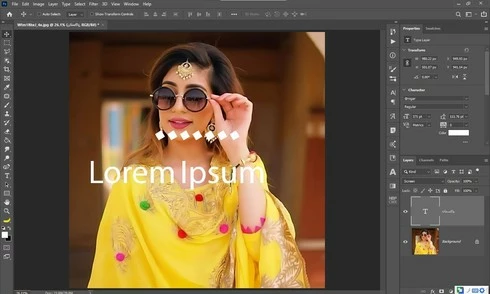
Yesterday i update my photoshop cc 2020 21.1.3 to 21.2 latest one but i got some bugs 1st one is that when i used text tool and write some thing like arabic text the screen display 2 text one is mine 2nd one is default text which one is freez and some of my arabic fonts did not work in it . i also attached a screen shot along this complaint ...my 2nd problem is GPU disable ater updates i am trying to updates my drivers already updated i trying everything but still problem ... sorry for my bad english and thanks in advanced ..
This topic has been closed for replies.

54 replies

mayal33876248
Participating Frequently
June 23, 2020
I'm having the same problem with Hebrew fonts. Many Hebrew fonts which are working in previous PS versions, stopped working in CC2020 v21.2.
All the Hebrew fonts were working perfectly prior to the v21.2 update, and they are still working perfectly on PS cc2019, and any other MS Office software.
Adobe support told me that the fonts are not PS compatible, but how could it be that it is not working only on PS cc2020 v21.2????
I even tried to troubleshooting of adobe support for font, but with no luck.
I'm guessing that in this last release, adobe did some changes to font (which they did, it is even written in their release notes), but this change affected middle eastern languages (Arabic, Hebrew...)

David Mohr
Participating Frequently
June 22, 2020
Hi Jeera,
Could you share a few example files of this with me?  I'm not seeing what's wrong in your image.  Could you post the results of opening this doc with 21.2?  Are you facing this issue with all fonts or just certain ones?  When you open documents in 21.2 do they change from their earlier layout?  On-edit or on-update or on-open or ...?
I'm in California (PST), but I'm happy to do a web-hosted screenshare with you via the internet to get to the bottom of this problem.  We can speak in English, French, Spanish, or German, if any of those languages are easier for you.  I'd offer Arabic, but my verbal is pretty terrible, sorry....8-(  But it would be helpful to see this problem demonstrated.  Would you be willing to post a video?

With your help, we'll get to the bottom of this, inshallah,Shukran,David
Inspiring
June 17, 2020

thanks for reply again sorry for my bad english 
i have this specification machine let me clear you about fonts actually i hace two photoshop version new one and last one the fonts mostly i am useing are arabics most of fonts are not working which i show you in last screen shots when i used same fonts in old version he is fine i attached one more screen shot same font in old version where the font is display the clear name 
David Mohr
Participating Frequently
June 17, 2020
MarHaba ya Jeera,
Let me start with what I know least about, GPU.  If you're having issues now after the update, it is probably because we've had problems with your card in the past and you might be in the situation where your card is problematic.  You should update all your drivers and/or turn off GPU if you can't do so.  Which card do you have?

As for the Arabic typography, what?  8-(  I'm not seeing this at all.  I noticed your comment in another post and found this post.  I am DEFINITELY not seeing what you are.  But I wonder if it could be a legacy of other problems.  Please got to Preferences > Performance and at the bottom left, is Legacy Compositing checked or unchecked?  Which OS are you running on?  Which language and version?
We'll get this figured out.
Shukran,David