


Inspiring
June 17, 2020

P: Arabic text issue

  • June 17, 2020
  • 54 replies
  • 4748 views

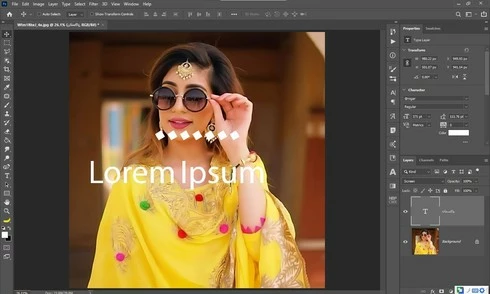
Yesterday i update my photoshop cc 2020 21.1.3 to 21.2 latest one but i got some bugs 1st one is that when i used text tool and write some thing like arabic text the screen display 2 text one is mine 2nd one is default text which one is freez and some of my arabic fonts did not work in it . i also attached a screen shot along this complaint ...my 2nd problem is GPU disable ater updates i am trying to updates my drivers already updated i trying everything but still problem ... sorry for my bad english and thanks in advanced ..
This topic has been closed for replies.

54 replies

David Mohr
Participating Frequently
June 24, 2020
MarHabtayn ya Mohammad,

Okay.  I can easily repro the Windows version of this bug.  And I'm happy to hear that you can't trigger anything on Mac.  Thanks for the confirmation.

Would you mind terribly trying this with regular English/French/German/whatever text?  I am not seeing this with Latin or Asian script, but I'm also not always able to replicate this, and I want to make sure that truly no one has this problem with other writing systems.  It'll help isolate where the problem lies.  With that, we'll get this fix, inshallah!

Tusbah al khair wa shukran,
David
Inspiring
June 24, 2020
Marhaba ya David,
Yes it happened in Arabic Only, and i didn't test Hebrew and this happened in Windows Version of Photoshop , my friend have mac and also Updated to latest photoshop and he told me the Arabic fonts Working well, So i think this issue related only to Windows version of Photoshop,

Best Regards
Mohammad
David Mohr
Participating Frequently
June 24, 2020
MarHaba ya Mohammad,
Hey, andi so'al, which OS are you running?  Windows10?  Mac 10.15?  As you can see, we're now aware of this problem, which appeared in 21.2.  We're trying to narrow down all the various manifestations of it.  Are you seeing this with both Latin and Arabic script or only with Arabic script.  Thus far, I've only seen it in Hebrew reliably.  If you're seeing it with both writing systems, do you see it also in a Left-to-Right context (I realize the Arabic will be badly-formed)?

Shukran,David
Inspiring
June 24, 2020


Any Arabic font from Graph East Started With GE are not Compatible with the Latest Update of Photoshop  (Adobe Photoshop Version: 21.2.0 20200604.r.225 2020/06/04: 02a81f3015  x64) so i have to rolling back to (Adobe Photoshop Version: 21.1.3 20200508.r.190 2020/05/08: 73760933ad5  x64) and the Problem is Fixed and the Arabic GE fonts Worked Noramally
David Mohr
Participating Frequently
June 23, 2020
Howdy Maya,

So, first, I'm not a DEV, but a QE on the team.  That said, I'll do my very best to get to the bottom of this problem you're having.  Internationalization and typography issues are my specialty.  8-)

I'll try downloading the 3rd, 5th, and 9th fonts from the site you gave me, though that third one is called  דנה יד which would be Dah Yad in English, right?  (My Hebrew is really bad, sorry)
You say that you had the same problem with the Latin/CJK engine?  If you could share a video of that with me, it would be handy to show the DEVs.  As I mentioned, I can't repro this here, so there's some element you (and many other Hebrew and Arabic users) have that I do not causing this.  Let's figure out what it is, ok?
I've two small kids, so a meeting after their asleep at 10 or 11pm PST works and that should be 8 or 9am for you, right?  I can also do 9am which would be 7pm for you if that's better (before that, you'd have to deal with a storm of questions and a very jealous almost-two year old)...

Toda,David
p.s. -- you'll be getting an email from me in a minute...8-)
mayal33876248
Participating Frequently
June 23, 2020
Hi David,
Thank you for the answer.
for some Hebrew fonts which are not working in this release, you can download it from:
http://freefonts.co.il/

(sorry, the website is in Hebrew, but every blue button with download arrow is for downloading a specific font). Please download the third one from the top. The name of it is "Dana Yad AlefAlefAlef". 
You may also download the fifth one from the top, the name of it is "makbiyg".
And also the ninth from the top, the name of it is "Drugulin".


Regarding the type engine, I just did a test and changed it to Latin and east asian layout option, and same problem occurred.

If you could send me your e-mail address, I would gladly send you the log file of the FontTest script which I ran.

Web demo can be a great idea. I'm located on the other half of the world, so I'm working with GMT+3, so I'm guessing we could do it during my early evening (around 20:00 my time, for you it is 10am) or my morning (08:30 my time, for you it is 10:30pm). and... in any case, not tomorrow, but Thursday. I have no problem with English.

Again, thank you very much for you help and reply!
Maya
David Mohr
Participating Frequently
June 23, 2020
Howdy Maya,
Let me try to help you out with this.

First, could you give me specific font names that you're having problems with?  Three or four would be great.  That way I can test those specific fonts on my end.

Second, I KNOW that the Latin/CJK type engine will not correctly build Hebrew (or Arabic or Persian), but if you use the European type engine, do the letters appear, albeit backward and out of order?  I'm asking to see if the problem is specific to the MENA type engine or with PS's type path in general.

Third, what was the results of the Adobe font test?  He he he, I ask cuz when those results are anything other than good, an email is supposed to come to me and I don't recall your name...8-)  Those results might be handy for diagnosing this too.

Finally, if it would be helpful and not a pain, I'm available to do a web-hosted screenshare with you, to help try and get to the bottom of things.  I work odd hours (two small kids at home), so I can flex to most any timezone, though mine is PST (California).  If another language is easier, we can speak in French, Spanish, or German.


I hope that helps.
Thanks,David
Inspiring
June 23, 2020
same problem i am  facing  in new photoshop v21.2
mayal33876248
Participating Frequently
June 23, 2020
mayal33876248
Participating Frequently
June 23, 2020
I'm having the same problem with Hebrew fonts. Many Hebrew fonts which are working in previous PS versions, stopped working in CC2020 v21.2.
All the Hebrew fonts were working perfectly prior to the v21.2 update, and they are still working perfectly on PS cc2019, and any other MS Office software.
Adobe support told me that the fonts are not PS compatible, but how could it be that it is not working only on PS cc2020 v21.2????
I even tried to troubleshooting of adobe support for font, but with no luck.
I'm guessing that in this last release, adobe did some changes to font (which they did, it is even written in their release notes), but this change affected middle eastern languages (Arabic, Hebrew...)