


Inspiring
June 17, 2020

P: Arabic text issue

  • June 17, 2020
  • 54 replies
  • 4748 views

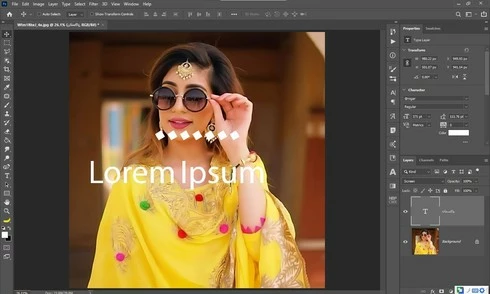
Yesterday i update my photoshop cc 2020 21.1.3 to 21.2 latest one but i got some bugs 1st one is that when i used text tool and write some thing like arabic text the screen display 2 text one is mine 2nd one is default text which one is freez and some of my arabic fonts did not work in it . i also attached a screen shot along this complaint ...my 2nd problem is GPU disable ater updates i am trying to updates my drivers already updated i trying everything but still problem ... sorry for my bad english and thanks in advanced ..
This topic has been closed for replies.

54 replies

Vinod Balakrishan
Adobe Employee
Adobe Employee
June 25, 2020
Thanks Maya, All openType font with the needed tables for Hebrew should work. Can you tell me where to buy these font like Dana Yad AlefAlefAlef, FbAfarsek, Mekorot-Rashi. ?
mayal33876248
Participating Frequently
June 25, 2020
and... specifically about Arial and Hebrew Myriad - these fonts work
mayal33876248
Participating Frequently
June 25, 2020
Hello Vinod,
Some of the openType fonts are working, and some not.
The following OpenType fonts are working (they have the "O" next to their name in the dropdown list):

Adobe Hebrew
Aharoni
David
FrankRuehl
Gisha
Hadassah Friedlaender
Levenim MT
Miriam
Miriam Fixed
Myriad Hebrew
Narkisim
Rod
Varela Round


The following OpenType fonts are not working (they have the "O" next to their name in the dropdown list):

Dana Yad AlefAlefAlef
FbAfarsek
Guttman family (there are many types of Guttman fonts, but the whole family does not work)
Mekorot-Rashi
Noot

I looked over the fonts that have  "T" next to their name in the dropdown list, and same happens there - some are working but most of them are not working (opposite to the "O" group where some are not working but most of them are working). So I 'm not sure you can make a rule out of it.
Vinod Balakrishan
Adobe Employee
Adobe Employee
June 25, 2020
Hello there
We are trying to find the bottom of the problem. Does this problem happens with Hebrew Myriad or Arial Hebrew. or any other OpenType Fonts? 

Photoshop Engineer
Vinod Balakrishnan
mayal33876248
Participating Frequently
June 25, 2020
Great news! I hope the developers will quickly find and fix this bug.
David Mohr
Participating Frequently
June 25, 2020
Thank you, Maya.  This clearly demonstrates the issue.  And, you're seeing what I am, that this problem is unique to the World Ready composer in a R2L context.  This nicely limits where we need to make the fix.
Have a great morning!David
mayal33876248
Participating Frequently
June 25, 2020
mayal33876248
Participating Frequently
June 25, 2020
Hi,
So, I'm preparing the video which checks world ready type engine and Latin type. I think the problem now is more focused...
It only exists in world ready type for L2R fonts.
I will upload the video for you to see
David Mohr
Participating Frequently
June 24, 2020
Howdy Maya,

I think we MIGHT have it.  The thing is, if what's being proposed really is the source, then this should affect Latin (and Asian) text, which I haven't seen.  So I'm a little doubtful.

If you have a video demoing this problem impacting Latin / Asian text, particularly in the L2R context, that would be helpful, as it would suggest the problem (and fix) is in another place.  If you're up for it, we could still do the demo, although a video I can share with the team is actually even better at this point.

Also, for what it's worth, if you have issues with R2L type, please report them so we can get them fixed.

Thanks!
David
mayal33876248
Participating Frequently
June 24, 2020
Hi David,
Do you say you actually found the problem?
Do you still want to make the web demo? Do you still need a video from me with the latin type engine?

Br,
Maya