


Inspiring
November 6, 2019

P: Batch is removing parts of names after . in name

  • November 6, 2019
  • 16 replies
  • 992 views

when running a batch to save as a jpg from tif files, anything with a (.--) is removed....
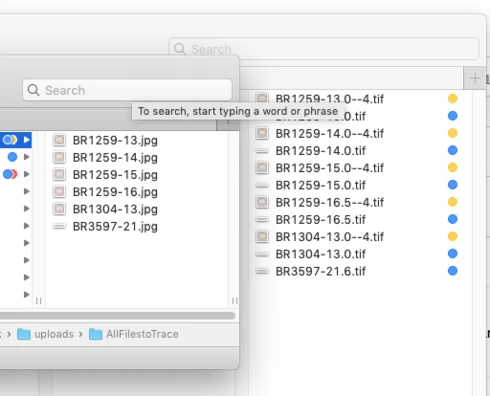
For example, file ABCD23.5.tif is saved as ABCD23.jpg, so .5 is removed... and other files are skipped or not processed at all.... previous versions has no issue with this... but when running an action while the file is opened, it is saving with a .5, but with thousands of image, i can't be opening them all as opposed to running a batch. Something done different from previous version?
https://feedback.photoshop.com/
This topic has been closed for replies.

16 replies

JJMack
Community Expert
Community Expert
January 17, 2020


Photoshop 2020 Actions with Save As steps will save incorrect File names when Document names contain "."  where prior versions of Photoshop work correctly. 

Reported is Photoshop Forum
https://community.adobe.com/t5/photoshop/photoshop-21-0-2-batch-action-file-type-change-error-period-in-file-name/td-p/10811761
JJMack
Participating Frequently
December 4, 2019
I don't use Batch in my action. My action knocks down 16bit ProPhoto files to 8bit sRGB. Then saves the file to a different folder. This is where the problem arrises. Somewhere when it goes to a different folder. If I didn't have the file going to a different folder and just saving over the original, the problem doesn't exist. My action is Crop, convert to sRGB, 8bit, Save (not save as.)
Legend
December 4, 2019
There is a known issue with Bridge Batch Rename removing the file extension with a double dot in the filename. I wonder if this is related?
Inspiring
December 3, 2019


I have a series of 3d renders with sequential names like...

render.0001.exr
render.0002.exr
render.0003.exr  etc..

Previous to the new 2020 update, I could open these files in photoshop and run an action that would tweak various things then save a tif version to a folder on my desktop.  But now when I run the same action (or try to make a new action), the files save as 'render.tif' instead of 'render.0001.tif', so running the action on ten files in a row just repeatedly saves 'render.tif' over itself again and again.

That's a bizarre behavior change and affects my workflow several times a day.  I assume it must be bug because It makes no sense for Photoshop to ever silently change a file name like that.
Legend
December 3, 2019
Try using Scripts > Image Processor... as a workaround

That should preserve your file naming.
Participating Frequently
December 3, 2019
Myself and another coworker as having the same saving issue as part of an action. Removes any text after the first . (period). Saving 8 bit tifs from 16 bit tifs. Action has been working for at least four years with minor changes. No changes in the past two years. I am running Photoshop 2020 on a Mac Pro (Mid 2012) with macOS High Sierra 10.13.6. Co-worker is running Photoshop 2020 on a MacPro (Late 2013) with macOS Mojave.