Participating Frequently
April 14, 2021

P: Can't detect GPU

  • April 14, 2021
  • 156 replies
  • 8535 views

Recently I just did an update of Photoshop to V22.3.1

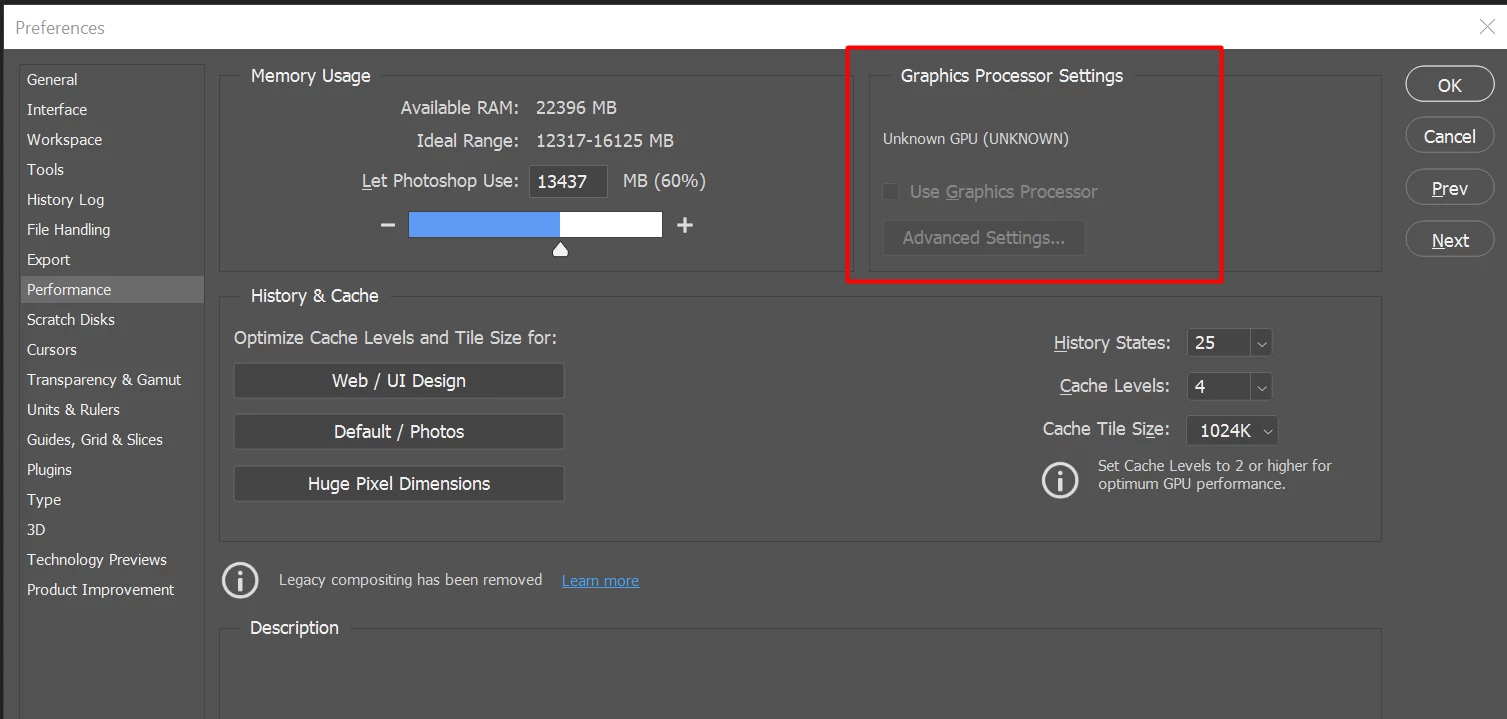
After I launched PS, and then go to the performance dialog box, then noticed that it can't detect my GPU GTX1050i.

This was working fine with the previous version of PS. I suspect that the latest update had something to with this problem.

Thank you

BR,

FS Wong

This topic has been closed for replies.

156 replies

Participating Frequently
April 15, 2021

Oh! Sorry to hear you’re facing this too. I had doubts that perhaps the issue only affects older GPUs like mine, but now with someone reporting the same thing on RTX3060 means it’s just a software bug. Let’shope Adobe comes with a fix very soon!

Inspiring
April 15, 2021

Got my new notebook today and have the same issue with a core-i7 and a GeForce RTX3060. I'm downloading the older PS version now...

Participant
April 15, 2021

Same issue on my Microsoft Surface Book with Nvidia GeForce GTX1060. Rolling back to earlier versions did NOT help. Have tried every version available to me, and also checked out all the troubleshooting steps I could on Adobe Help with no change to my predicament.

Haven't been able to edit photos for weeks and have to say, I'm not happy.

Inspiring
April 15, 2021

I have the same card as you and it does work on 22.3

Participating Frequently
April 15, 2021

I know it sounds silly, but have you tried restarting Photoshop and see what happens? The latest update seems to behave very inconsistently. It appears to work (partially or fully) for some users at first, and then either works or breaks after restarting PS and/or the computer.

Eagle-Eye_MJG
Participating Frequently
April 15, 2021

I have a 1080Ti and AS SOON as I updated to the latest version of Photoshop (version 22.3.1), I noticed that my graphics card was detected but they REMOVED some of the options that used to be there in "Advanced".

71-L3N
Inspiring
April 15, 2021

Interesting is that Illustrator also uses GPU and have no issue with yesterday's update.

Inspiring
April 15, 2021

Yes! Scrubby zoom is back! At least for now...Have closed and reopened PS twice and seems OK. What a waste of time though 😞

Inspiring
April 15, 2021

I'm also having this problem with NVIDIA Geforce MX250. Spent a couple of hours trying to sort it last night, then another couple of hours this morning. As far as I know I have the latest graphics driver version installed but every step seems so complicated for someone who isn't a PC tech, just a lowly photographer! I've followed advice above and reinstalling previous version of PS 22.3. Fingers crossed...

Inspiring
April 15, 2021

Yes I had exactly this too.