Participating Frequently
April 14, 2021

P: Can't detect GPU

  • April 14, 2021
  • 156 replies
  • 8536 views

Recently I just did an update of Photoshop to V22.3.1

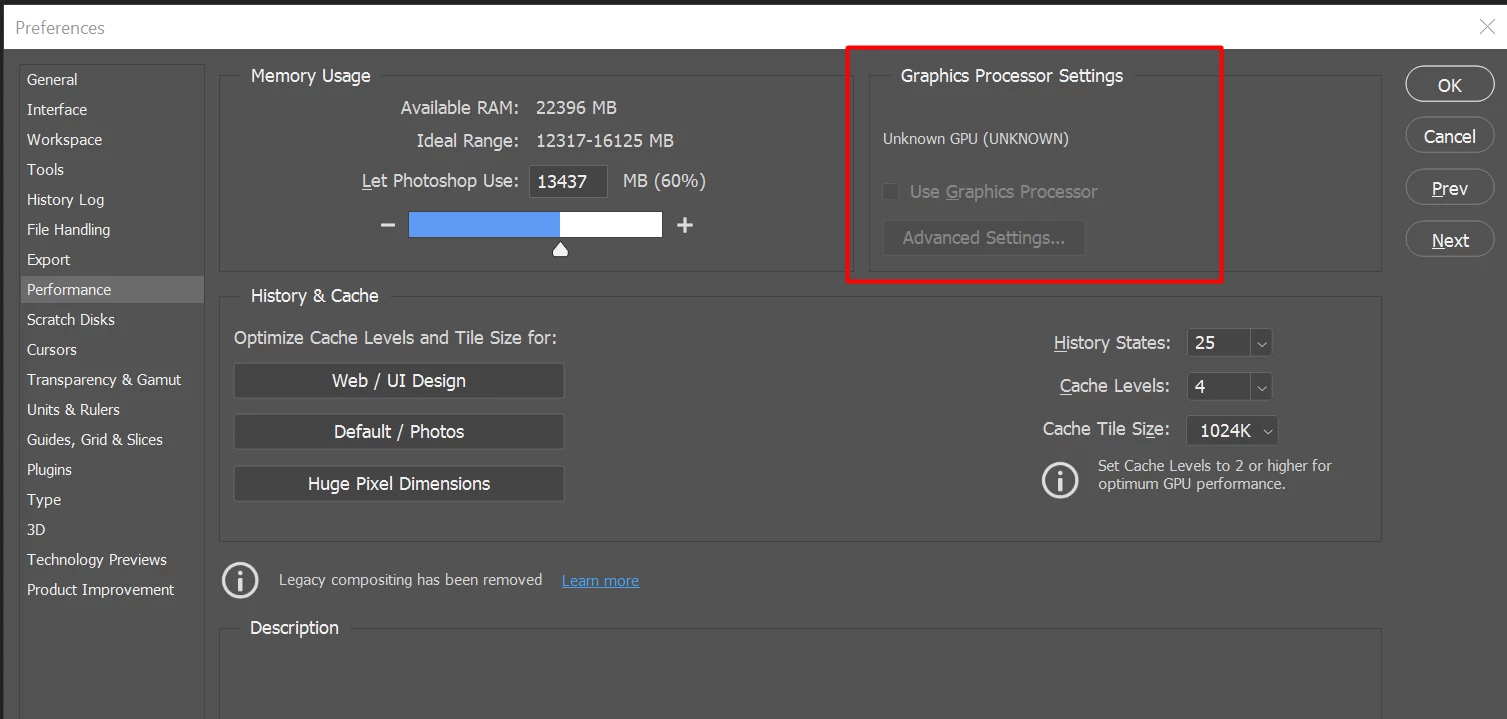
After I launched PS, and then go to the performance dialog box, then noticed that it can't detect my GPU GTX1050i.

This was working fine with the previous version of PS. I suspect that the latest update had something to with this problem.

Thank you

BR,

FS Wong

This topic has been closed for replies.

156 replies

Participant
April 15, 2021

Wow.... I'am back...!!

Participant
April 15, 2021

Thanks everybody.... try it after my current work will be saved....!!

Inspiring
April 15, 2021

@Traumfaenger yes, it's kind of sad that a high profile, professsional product like PS has this kind of QA problems for W10.

You go back to earler version by using CC app where you installed PS. It will give you options to go back to earlier versions in the menu.

Participant
April 15, 2021

Hi everybody, same problem here - but I've not idea how I can go back to former version.... Got a lot of customer orders and I've to work with ugly PS update in slowmotion - It's a nightmare!!

Inspiring
April 15, 2021

*GBussey roll back to 22.2 not 22.3

Inspiring
April 15, 2021

Same issue with an AMD Radeon RX5700 XT on Windows 10

I have tried rolling back versions but it hasn't fixed the issue

71-L3N
Inspiring
April 15, 2021

FYI

For testing purpose I manually delete PS settings folder which is located under C:\Users\<username>\AppData\Roaming\Adobe\Adobe Photoshop 2021, and than PS started working fine with GPU detected, however when i closed PS and reopened it, PS did not detect GPU.

BobWongAuthor
Participating Frequently
April 15, 2021

I suspect some thing went wrong with the latest PS version.

71-L3N
Inspiring
April 15, 2021

Same issue with update 22.3.1 on GPU Quadro P2000 (465.89 DCH driver version) and Windows 10 20H2 (19042.928).

Roll back to version 22.3.0 works fine