Participating Frequently
April 14, 2021

P: Can't detect GPU

  • April 14, 2021
  • 156 replies
  • 8536 views

Recently I just did an update of Photoshop to V22.3.1

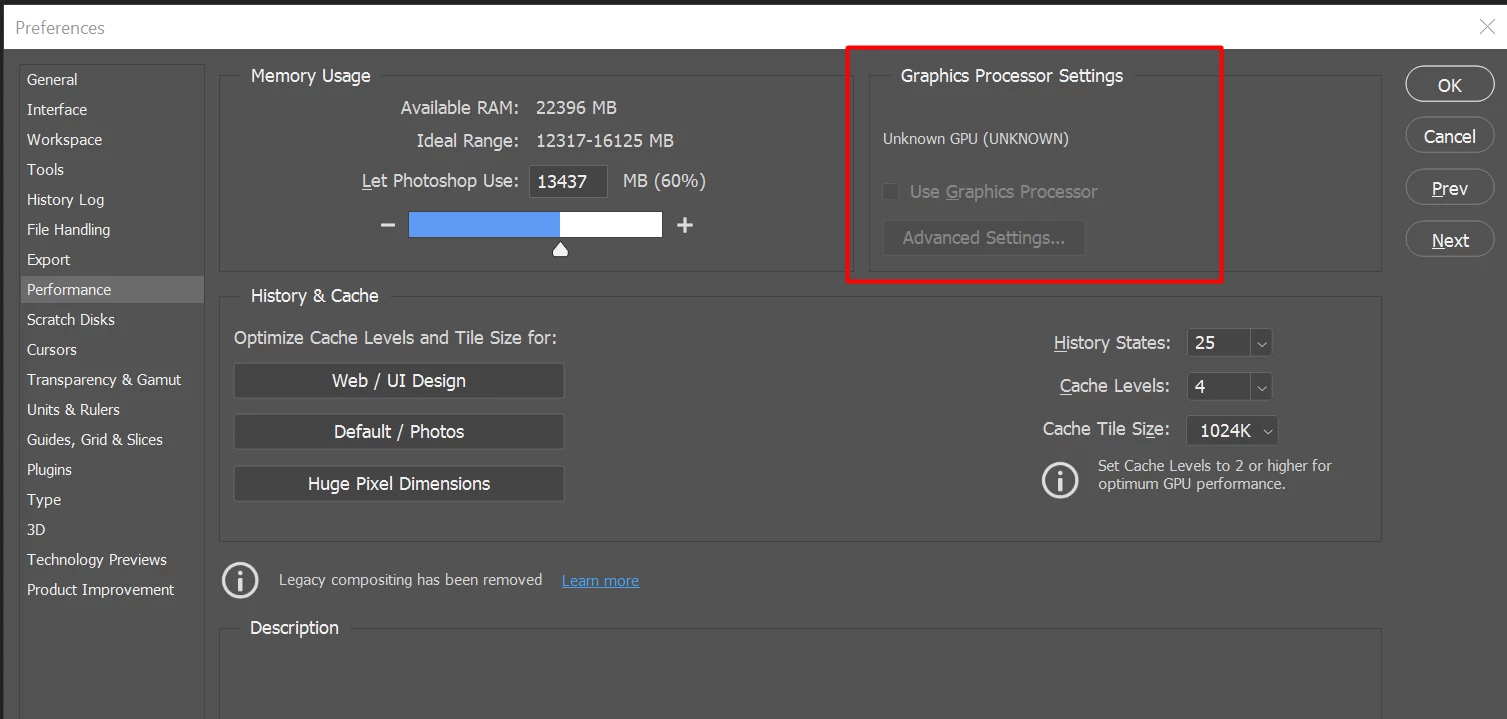
After I launched PS, and then go to the performance dialog box, then noticed that it can't detect my GPU GTX1050i.

This was working fine with the previous version of PS. I suspect that the latest update had something to with this problem.

Thank you

BR,

FS Wong

This topic has been closed for replies.

156 replies

BobWongAuthor
Participating Frequently
April 14, 2021

I rolled back to v22.3.0 and it's working now

Inspiring
April 14, 2021

for Amd cards you need to go back to 22.2.

BobWongAuthor
Participating Frequently
April 14, 2021

Yes, I reverted back to 22.3, and it's working now!

Participating Frequently
April 14, 2021

Yeah, so a driver compatibility issue is an unlikely scenario here since it's affecting GPUs from both makers.

Participating Frequently
April 14, 2021

Same issue here with the GTX 1050 Ti.
Reverting back to 22.3 or earlier is the only way to get it working for now.

Inspiring
April 14, 2021

AMD 5500XT 8gb here, same problem. So it's not just AMD related but Nvidia as well.

Also had this problem in the past 22.3 version. Rolling back to 22.2 is the last working, GPU Accel friendly version.