


Inspiring
December 7, 2018

P: Content aware tool not working

  • December 7, 2018
  • 14 replies
  • 15159 views

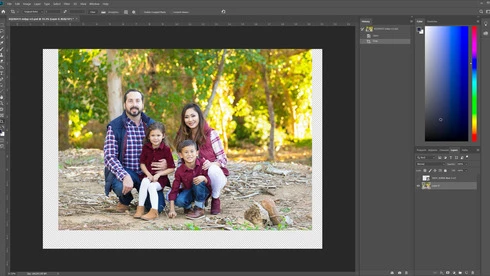
I'm trying to extend an image and when using the crop tool with the content aware box checked, it does nothing. I just used this tool yesterday with no problems. I'm assuming an update bug broke it. Any ideas??
This topic has been closed for replies.

14 replies

Joel xo
Inspiring
December 10, 2018
It just happened to me again. What happens is you check the box, and as soon as you manipulate the crop frame, it unchecks itself. If you don't notice that happening, you get the above results. If you check it again just before you commit, it unchecks itself. Sometimes the check box is greyed out.

It's intermittent and I don't know what causes it. Once it starts I can't stop it by changing tools and changing back to the crop tool, only turning the background layer into layer 0 makes it work again.


steve13kenny
Participant
December 8, 2018
I have tried to replicate your issue with no success...but I DID notice that the Content Aware box is NOT checked in your screen capture here...?
JohanElzenga
Community Expert
Community Expert
December 8, 2018
The Content Aware checkbox is not activated in your screenshot...
-- Johan W. Elzenga
Joel xo
Inspiring
December 7, 2018
Not sure if this is the same issue, but I've caught it misbehaving like that until I changed the Background layer to a regular layer. Only happens sometimes; maybe that's worth a try?