Participating Frequently
October 25, 2013

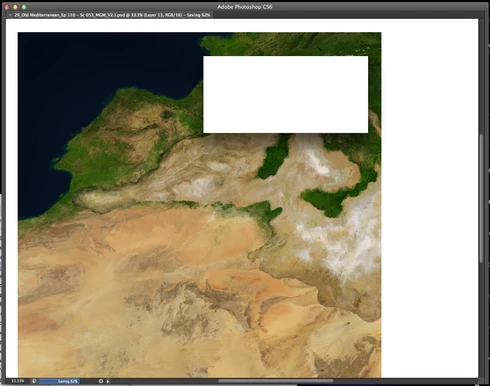
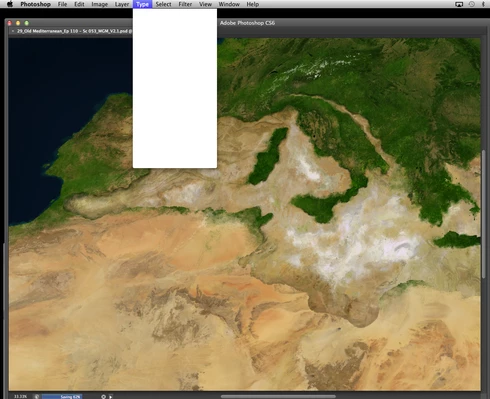
P: CS6/CC Menus blank (white) Mavericks Mac OS X 10.9

  • October 25, 2013
  • 208 replies
  • 2463 views

Hello, I hope I am in the right place for this:

I am on a Mac 2.2 GHz Intel Core i7, with 16 GB 1333 MHz DDR3. I just installed OS Mavericks. I am running Photoshop CS6.

Randomly throughout using the program, my windows/palettes (i.e. the layers palette) will become white. Even the "Save" window menu will become white. It's still functional (if I press enter on the save menu, it will save), but I can't see any of the options. I've uninstalled the program and reinstalled. This has unfortunately not solved the problem. Please help

Thanks for the help in advance!

Michael
This topic has been closed for replies.

208 replies

Participant
April 4, 2014


Photoshop CS6,13.0.6. Mac pro OS10.9 32 Gig ram, running on accelsor SD. I have been getting crazy freezes that present with whited out menus , can't save have to force quit. I have re installed, trashed preferences etc. My files are very large but I have been working this way for years. Any thoughts????
Known Participant
March 22, 2014
Chris, I certainly have no sympathy with Apple's stance on this, it sounded downright evasive and unhelpful to me
Mac OS Sonoma, 64 GB RAM 27" 2019 iMac 3.6 GHz 8-Core Intel Core i9
cathyling
Participant
March 22, 2014
This is a great thread. I am just now getting up to date on this stuff (new late 2013 iMac with Mav updates plus latest PS CC download) and boy am I crabby after going through this blank white menu thing. Also newby to forum but want to remember to be part of this as it moves along.
Legend
March 8, 2014
Please try the solution in this document:

http://helpx.adobe.com/photoshop/kb/p...

Installing the plug-in from the document above should solve:

• menus, panels, or dialog boxes turn white and become unresponsive
• keyboard shortcuts stop working
• lasso tool selections close prematurely
• Photoshop becomes unresponsive

Let us know if this solves your issue.
Legend
March 8, 2014
Did you try the solution in the official answer?

Please try the solution in this document:

http://helpx.adobe.com/photoshop/kb/p...

Installing the plug-in from the document above should solve:

• menus, panels, or dialog boxes turn white and become unresponsive
• keyboard shortcuts stop working
• lasso tool selections close prematurely
• Photoshop becomes unresponsive

Let us know if this solves your issue.
Inspiring
March 8, 2014
I just finished reading all these threads hoping that there would be a solution at the end. I am having the SAME exact problem with CS5 when I plug in Wacom tablet and only then. Does photoshop just leave you out in the cold knowing that all these ppl are having problems? Where is the solution?
Inspiring
March 7, 2014
Thanks, though I already tried this plug-in. And as I mentioned am on Elements, so when I tried to launch it the software said that the file is not recognizable.
Inspiring
March 7, 2014
See the answer at the top of the topic.
Inspiring
March 6, 2014
Hello! Another one having all the same problems... but with PS Elements 12... Would really appreciate some advice as unable to save my work!!! Thank you in advance! I also use a bamboo tablet... surely that's not causing these problems? 🙂
Inspiring
February 26, 2014
Thanks guys! Chris: hope you guys sort it out soon, this is getting extremely frustrating.