Participating Frequently
October 25, 2013

P: CS6/CC Menus blank (white) Mavericks Mac OS X 10.9

  • October 25, 2013
  • 208 replies
  • 2474 views

Hello, I hope I am in the right place for this:

I am on a Mac 2.2 GHz Intel Core i7, with 16 GB 1333 MHz DDR3. I just installed OS Mavericks. I am running Photoshop CS6.

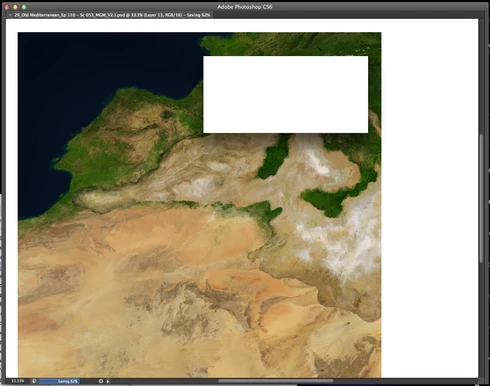
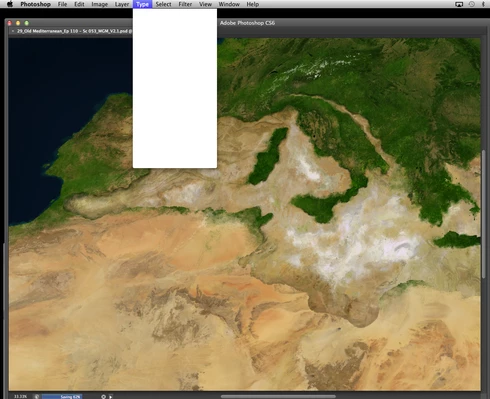
Randomly throughout using the program, my windows/palettes (i.e. the layers palette) will become white. Even the "Save" window menu will become white. It's still functional (if I press enter on the save menu, it will save), but I can't see any of the options. I've uninstalled the program and reinstalled. This has unfortunately not solved the problem. Please help

Thanks for the help in advance!

Michael
This topic has been closed for replies.

208 replies

image33photo
Participant
October 31, 2013


I have CS6 and since upgrading to OS X Mavericks, Photoshop is buggy. After using it for a few minutes, all the drop down menus go blank - they're just white. I have to save, close and re-open Photoshop every few minutes. ??
image33photo
Participant
October 31, 2013


I have CS6 and since upgrading to OS X Mavericks, Photoshop is buggy. After using it for a few minutes, all the drop down menus go blank - they're just white. I have to save, close and re-open Photoshop every few minutes. ??
Participating Frequently
October 29, 2013
I know it may be too soon to report a success, however, yesterday I had no 'blank menu issues' at all.

I worked in Photoshop for 10 hours.

About a week ago I had installed the 6.3.7-3 (10.6x - 10.9x) driver on my computer. This was in response to the blank menu problems I was having, but had no success.

1. I still incurred the blank menus

2. I was unable to access my wacom preferences inside system prefs (?)

3. My computer would no longer recognize my older Intuos 3 tablet

Yesterday morning, I had resinstalled the exact same driver 6.3.7-3 (10.6x - 10.9x) and the problem did not occur for 10 hours. I was also able to access my wacom preferences and my computer recognized my Intuos 3 tablet.

I will update as I go on my progress, since I know how much of a major hinderance this problem can be.

-Michael
Participating Frequently
October 29, 2013
Updating my tablet driver (intuos 4) seems to have done the trick! I've been working for about 7 hours without any issues. Thanks a lot, Jeffrey!
Legend
October 28, 2013
Sweet. Thanks for closing the loop. Let us know if it pops back up or if that solves it for good.
Participating Frequently
October 28, 2013
I have reinstalled the wacom driver as suggested. I can now access my wacom preferences under system prefs. Also, my intuos 3 is finally showing up and working correctly, as well.

I will keep you posted on whether or not this fixes the blank menu bug.

Thanks for the help thus far Jeffrey,

Michael
Legend
October 28, 2013
Hmm. The customer on twitter reports getting the latest wacom driver has corrected this issue for him.
https://twitter.com/tiutenko/status/3...

Anyone else able to update and have everything work correctly?
Participating Frequently
October 28, 2013
Yes and I've installed the latest driver 6.3.7-3

I've noticed that my regular Intuos 3 is no longer recognized by Mavericks and also that my system preferences for my wacom are not accessible (I get an error message: Could not load Wacom Tablet preference pane.)

I realize this is not a Photoshop issue of course, but I thought it may help with the diagnosis.
Legend
October 28, 2013
Is everyone on this thread using a wacom tablet or have the wacom driver installed?
Participating Frequently
October 26, 2013


Hi there

Since updating to Mac OS Maverick I get a major problem with Photoshop CC. It works fine for about 10mins, then the menus white out. I have to restart to make it useful. I've updated to the latest CC release (14.1.2) - I also tried removing and re-installing it but no joy. Please help 🙂 You can see a screenshot at http://www.peterthomasphotography.com...