Participating Frequently
October 25, 2013

P: CS6/CC Menus blank (white) Mavericks Mac OS X 10.9

  • October 25, 2013
  • 208 replies
  • 2463 views

Hello, I hope I am in the right place for this:

I am on a Mac 2.2 GHz Intel Core i7, with 16 GB 1333 MHz DDR3. I just installed OS Mavericks. I am running Photoshop CS6.

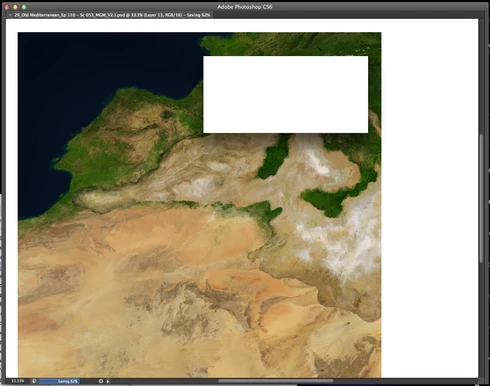
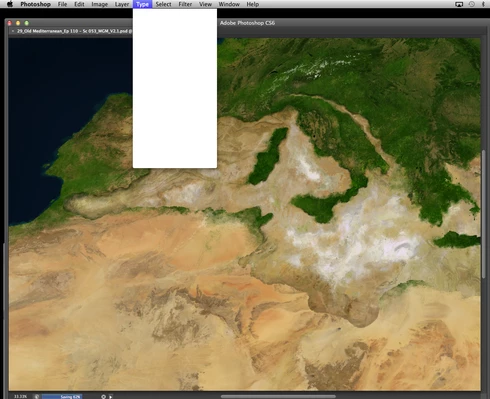
Randomly throughout using the program, my windows/palettes (i.e. the layers palette) will become white. Even the "Save" window menu will become white. It's still functional (if I press enter on the save menu, it will save), but I can't see any of the options. I've uninstalled the program and reinstalled. This has unfortunately not solved the problem. Please help

Thanks for the help in advance!

Michael
This topic has been closed for replies.

208 replies

jimdoggs
Participating Frequently
January 16, 2014

Aran,
Were all on the same team here. Relax. I want this problem fixed ASAP too. I'm a professional graphic designer and photographer that runs photoshop maybe 11 hours a day, for a little over 14 years now. I'm sure you are a professional like me and this problem is playing hell with your workflow as well, but let's all be civil. Clearly my last comment was un-thread related, but you could understand my frustration. T

Participating Frequently
January 16, 2014
Ok, tnx, I've probably been lucky then. I've done about 20-30hrs of PS work without any problems so far. But I'm confident that the Photoshop crew will find a solution soon.
Participant
January 16, 2014

please stop posting issues you know are unrelated to the problem in this thread. There are some of us following this issue and we get emails every time there's a comment posted. Please start or find a thread that is applicable to your specific issue.

On the other hand: everything you've described is a software based issue. Returning the hardware probably won't solve much. Computers and software are insanely complex and take troubleshooting, regardless of how new they are. Nothing is magic. If you'd still like to return it then please do so, no one is stopping you.

Inspiring
January 16, 2014
Yes, and it isn't a solution, it just makes the problem happen less often. See Jesper's and Jeff's posts above.
Participating Frequently
January 16, 2014
Have you looked at this comment?

'2 weeks ago, a guy named Bora Subakan posted a (temporary) solution, which helped for me. You would have to disable you Wacom pen's right-click button. I had 1 button assigned as space bar (to move te picture in PS), which is still working. However, my second button was assigned as right-click. I disabled that one, and I've been white-menu-free ever since.

It's not an ideal solution, but it's still better than having to restart PS every 10-15 minutes.'
Participating Frequently
January 16, 2014
TRY THIS AS A (TEMPORARY) SOLUTION:

2 weeks ago, a guy named Bora Subakan posted a (temporary) solution, which helped for me. You would have to disable you Wacom pen's right-click button. I had 1 button assigned as space bar (to move te picture in PS), which is still working. However, my second button was assigned as right-click. I disabled that one, and I've been white-menu-free ever since.

It's not an ideal solution, but it's still better than having to restart PS every 10-15 minutes.

To the Photoshop-staff on here: have you looked into this 'solution'?
jimdoggs
Participating Frequently
January 16, 2014

Jeff something unrelated to this link is starting to happen. my magic mouse is "drifting" to the left whenever i pick it up to adjust if off the pad. You must remember this is a BRAND NEW, ONE DAY OLD computer- so between my photoshop issues, and now this, I'm ready to bring this thing back to store.

jimdoggs
Participating Frequently
January 16, 2014

just installed the updates Jeff. FINGERS CROSSED!

jimdoggs
Participating Frequently
January 16, 2014

i will try.. see what happens from there.

Legend
January 16, 2014

I notice your copy isn't patched. That may have something to with it. You should be at 13.0.6: http://adobe.ly/PS-Up-To-Date

Choose Help>Updates... to run the updater.