Participating Frequently
October 25, 2013

P: CS6/CC Menus blank (white) Mavericks Mac OS X 10.9

  • October 25, 2013
  • 208 replies
  • 2463 views

Hello, I hope I am in the right place for this:

I am on a Mac 2.2 GHz Intel Core i7, with 16 GB 1333 MHz DDR3. I just installed OS Mavericks. I am running Photoshop CS6.

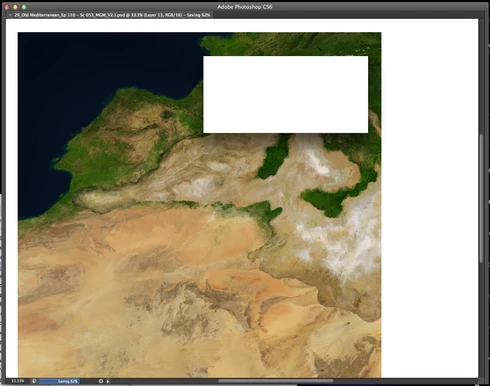
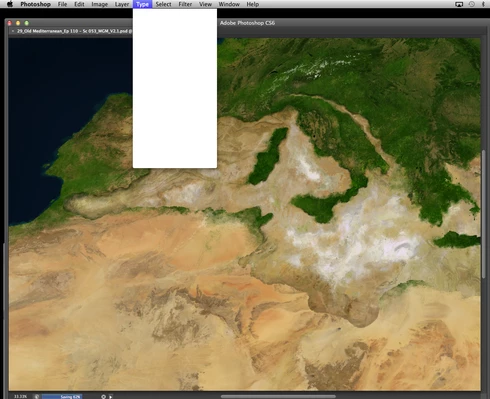
Randomly throughout using the program, my windows/palettes (i.e. the layers palette) will become white. Even the "Save" window menu will become white. It's still functional (if I press enter on the save menu, it will save), but I can't see any of the options. I've uninstalled the program and reinstalled. This has unfortunately not solved the problem. Please help

Thanks for the help in advance!

Michael
This topic has been closed for replies.

208 replies

Participant
January 15, 2014
Do you mind sending this plugin to me as well?
Participant
January 15, 2014
ok Ill try, even though it has been several days it hasn't showed up.
Known Participant
January 15, 2014
I'd be up for it.
Participant
January 14, 2014
Willing! Thanks!
Legend
January 14, 2014
Hey guys,

Jesper thinks he knows what the problem is and we have a workaround to avoid this issue that we'd like to test before making it more widely available. Let me know if you'd be willing to install a plug-in and test out this workaround. I will email you with details and instructions. Thanks!
Inspiring
January 14, 2014


I am running the latest OSX 10.9.1 and have a Cloud membership for Psd CC. It works fine most of the time but one problem keeps occuring when in the middle of working; instead of being able to read the dialog "Change canvas size", for instance, or "Save File As", the text window appears white, the text is invisible. And this is the same for all other windows - all invisible.
Other times, after saving an image, the tools do not work anymore. I have to close the file and re-open for it to works. I have 12GB internal memory and 1024mb of Vram. Any ideas? Have re-started, updated the Cloud and CC as well.
Inspiring
January 12, 2014
Same problem here.

OSX 10.9.1 with latest updates
Photoshop CC with latest updates
Wacom intros 4 (PTK 640) with latest driver v6.3.7-3
NVIDIA GeForce GTX 780M 4096 Mo
Inspiring
January 11, 2014
That's a different topic, and we have no reliable way to reproduce that (we've seen it 2 or 3 times, total). We're still pursuing the issue with customers who can reproduce it more often, and at least ruling out possible causes.
cindymetro
Participant
January 11, 2014
What about the issue with the brush tool? After using that tool, I frequently have to click outside of Photoshop to gain use of another tool or to continue using the brush tool. This is a huge issue with masking.
Inspiring
January 11, 2014
Thanks Chris for your help in diagnosing the source of this problem.