Inspiring
February 8, 2013

P: CS6 pdf export - text rendering problems

  • February 8, 2013
  • 19 replies
  • 1211 views

I've read through every forum post I can find, all that the almighty Google Gods have to offer, and have spent an hour of wasted time chatting with Adobe Support in regards to text rendering problems I'm experiencing with PS6. While I've seen MANY problems discussed, I haven't seen my exact problem discussed, so here's praying that I'm missing some completely obvious setting somewhere...

Text and colors are showing up beautifully when working in PS6, but when I render, seems like no matter what I do, the text goes haywire. I lose coloring and style upon render, but only on certain lines. It seems to select which bits of text to render correctly and which to spite in a completely arbitrary fashion. Here's what I'm looking at:
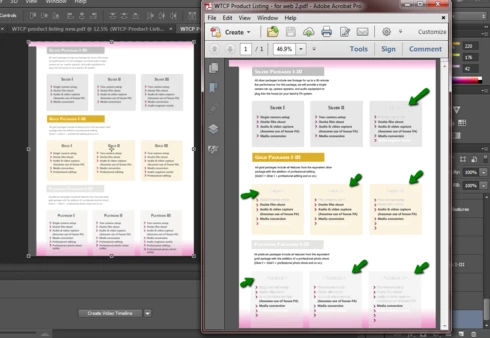


All of my text is set to 100% opacity. I'm on Windows 7, just upgraded to CS6. I've tried moving all of the text layers as the absolute top layers of the document. I've tried saving as pdf with the color settings "Blend Text Colors Using Gamma" checkbox both checked (as it was defaulted) and unchecked.
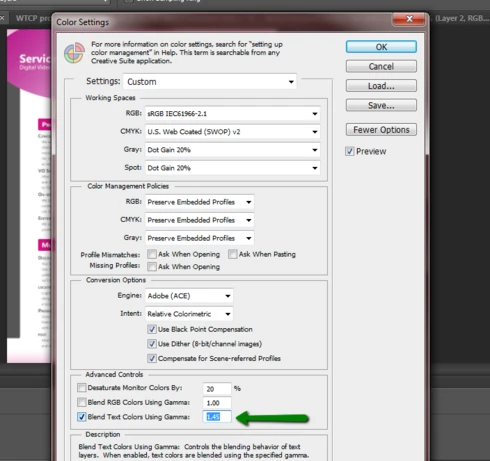


No dice. Same result. Is there some magic settings formula that I'm missing? These are some of the first documents I've created with PS6 and prior to troubleshooting this issue, I've used all default settings.

Halp! Please.

Thanks,
Erin

This topic has been closed for replies.

19 replies

Participant
August 24, 2013


Hello, I have discovered a bug with Photoshop CS6 that renders text improperly when saving my file as "Photoshop PDF", as described here by several other users here:

http://feedback.photoshop.com/photosh...

Could your team look into this and provide a fix? Thanks, Jonathan
Inspiring
July 5, 2013
Thanks everyone for flagging this problem and all the options! I had the same trouble with CS6 on mac OSX converting to PDF. I had the problem with that 7th line of text -- my solution was to just cut and paste that next portion into a new text field -- I didn't have to rastercize or anything. Then everything exported fine and all the fonts look great.

Strange issue but the key was just extra font fields!
Inspiring
May 15, 2013
There are dozens and dozens of posts about text problems going from Photoshop to PDF. My worry is with Photoshop 14 coming out next month, will PS CS6 see a fix? If it is not fixed in CS6, then that means the the very last perpetual version of Photoshop has, what I think is, a critical bug in production of PDFs?
Inspiring
May 13, 2013
Hey guys,
Im having the same problem while using Photoshop CS6 on OSX. Temporary workaround is to rasterize type, as its not critical for my project to use live text.
If it means anything, the issue presents itself on the seventh line as well.

Inspiring
March 26, 2013
Sorry to say David, that's not the problem. Not only does this occur on the Mac, but it occurs whether you have the fonts or not - regardless of what font it is. I can reproduce the problem 100% of the time with Arial or any other font.

That being said, like Robert, I noticed that this happens when it's blocks of multi-line text. If you have a word or two, it renders fine. If you have a whole paragraph, not only does it not render properly visually, but you can't even select the text in Acrobat. It's like it's not even there.
David Mohr
Participating Frequently
February 21, 2013
Hiya Robert,

What I've found is that sometimes this is caused by missing fonts on Windows. Yes, it's a bug, but if you make sure all your fonts are installed for all layers, that's a work-around for now.

Otherwise, if you're problem is something else (like you're on Mac!), feel free to send me a sample file and I'll look into it for you. Following up with a personal email.

Thanks,
David
Inspiring
February 19, 2013
Having the same issue when exported to Photoshop PDF. Random text problems. I painstakingly found that on the seventh line of text it caused the problem. Six lines or less no problems. But some text boxes with many lines rendered fine. So yes completely random and very frustrating. I tried exporting saving as PDF with CS5.1 and it rendered fine.
Inspiring
February 15, 2013
Sure will, David. I'll keep an eye out for your email.

Thanks,
Erin
David Mohr
Participating Frequently
February 15, 2013
Howdy Erin,

Would you be comfortable sending me a stripped down version of your file that exhibits this problem? I will follow up via email.

Thanks,
David