


Inspiring
November 15, 2018

P: Deleting a value in Duotone/Monotone dialog gives wonky results

  • November 15, 2018
  • 12 replies
  • 352 views

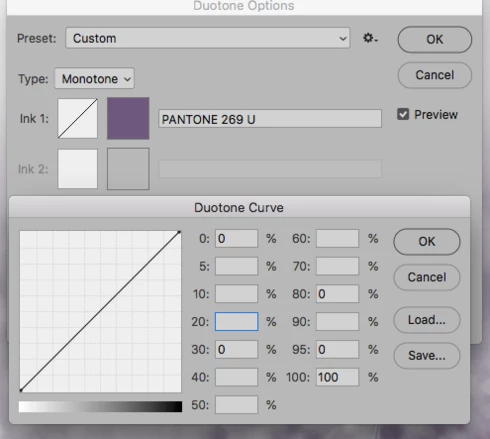
I am trying to use the monotone/duotone options in Photoshop 2019. I choose my color and click on the curve to adjust the values. If I decide I don't want a certain value in the box, I delete it, but instead of staying as an empty box it will place a 0 (zero). When you click OK, this causes the curve to go completely wonky. This did not happen in previous versions. Anyone else having this issue? The attached is just to show the zeros in the boxes (box 30, 80, and 95) where they should be empty. Even when I tab over to the next boxes a zero will be inserted.

I have updated to the most recent Photoshop  20.0.1 release hoping this would have been fixed but the issue is still there.
This topic has been closed for replies.

12 replies

Inspiring
January 15, 2019
YES!!! Thank you!
Participant
January 15, 2019
Thank you!
Legend
January 15, 2019
Correct. This issue was fixed in the 20.0.2 update: https://helpx.adobe.com/photoshop/kb/fixed-issues.html

Please let us know if encounter any problems. Thanks for reporting this!
jsdetwiler
Participant
January 15, 2019
I've just updated to Photoshop 20.0.2 and the problem appears to be gone. I was able to convert an image to greyscale, then duotone, and then adjust both colors repeatedly without a hitch. I could not find release notes for v20.0.2, so I am only going by my test results.
Inspiring
December 19, 2018
@Jeffrey:
Any updates you can offer will be greatly appreciated....
jsdetwiler
Participant
December 5, 2018
The only workaround I’ve found is to install the previous version of Photoshop and use that when you need to edit duatones. You can have both versions installed at the same time. It’s a pain.
Inspiring
December 5, 2018
same :{ trying to get file to printer. 
Inspiring
December 5, 2018
Same here. Please fix.
Participant
November 30, 2018
Same here. We have a 2-color publication, so duotones are crucial. Thanks.
Inspiring
November 27, 2018
any news on results of contacting engineering?I have same issue