


grauenwölfe
Inspiring
October 3, 2016

P: Direct + Path Selection Tools keep reverting back to Active Layers

  • October 3, 2016
  • 17 replies
  • 1104 views

Photoshop CC 2015.5.1 - Is anyone else having an issue with the Selection Tools not staying on All Layers?

Has been repeatedly set to:
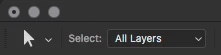

Consistently reverts back to:


I don't ever want it set to Active Layers, so I deleted the "Direct Selection Mode Toggle" keyboard shortcut a long time ago to keep from inadvertently changing it. I've saved a new Workspace after setting to All Layers, didn't make a difference. Don't know what more can be done to get it to stay. Any help?

This topic has been closed for replies.

17 replies

grauenwölfe
Inspiring
January 21, 2018
A little late to post but thank you and good job on this, Adobe.
Legend
October 19, 2017
Inspiring
July 13, 2017
Thanks for uncovering this! This happens on my system too. I'll also add that it seems to only happen if you press OK on the preferences dialog (hitting ESC doesn't trigger the reversion).

At least now I can predict when it'll happen, rather than being rudely surprised every time a path won't select unexpectedly. 

Hopefully they fix it eventually.
Earth Oliver
Legend
April 14, 2017
This bug is still present.
grauenwölfe
Inspiring
December 8, 2016
Thanks Jeff. Hope she's doing well.
Legend
December 7, 2016
Sorry I was out of the office for a week with my youngest daughter in the hospital when you replied. I'm getting caught up this week. Good sleuthing. I can reproduce what you describe and will have the engineering team look into it.
grauenwölfe
Inspiring
December 7, 2016
Any thoughts on this Adobe? Can you at least acknowledge you've seen this? Same thing is happening in CC 2017 too. Maybe change the title to include that since it's the same issue in CC 2015 and CC 2017.

  • CC 2015: opening 'Preferences' causes these specific Tools' options to reset.
  • CC 2017: opening then clicking anything in 'Preferences' causes them to reset.

eartho,
You've probably figured this out by now, but it is the cause of the 'Constrain Path Dragging' option resetting as well as the 'Active/All Layers' option.

Chisten,
Weird indeed. Always thought the 'Rulers being on causing performance issues' was the most random but this one is close. Maybe not as harmful, but weird and random nonetheless.
 
Inspiring
December 2, 2016
> Also, Opening "Preferences" changes any active tool to the Eye Dropper Tool, weird. So anytime Preference is opened the Eye Dropper Tool is activated AND the Path Tools get reset back to "Active Layers". >

That's got to be one of the weirder bugs I've seen. I'm impressed you were able to find the cause. Now we just need Adobe to find the cure.
Earth Oliver
Legend
December 1, 2016
>This option is reset anytime the "Preferences" dialog is opened. 

I can confirm that this is what causes the reset. Nice work tracking that down.
Earth Oliver
Legend
December 1, 2016
I've been having a related issue where the Constrain Path Dragging option isn't sticking. Something's obviously wrong the the Selection Tool prefs. If i remember correctly, this issue was flagged on the 2015 release and still has yet to be solved.