


grauenwölfe
Inspiring
October 3, 2016

P: Direct + Path Selection Tools keep reverting back to Active Layers

  • October 3, 2016
  • 17 replies
  • 1104 views

Photoshop CC 2015.5.1 - Is anyone else having an issue with the Selection Tools not staying on All Layers?

Has been repeatedly set to:
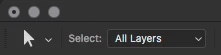

Consistently reverts back to:
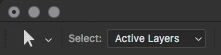

I don't ever want it set to Active Layers, so I deleted the "Direct Selection Mode Toggle" keyboard shortcut a long time ago to keep from inadvertently changing it. I've saved a new Workspace after setting to All Layers, didn't make a difference. Don't know what more can be done to get it to stay. Any help?

This topic has been closed for replies.

17 replies

grauenwölfe
Inspiring
December 1, 2016
OK, here is something I've tracked down.

This option is reset anytime the "Preferences" dialog is opened. Also, Opening "Preferences" changes any active tool to the Eye Dropper Tool, weird. So anytime Preference is opened the Eye Dropper Tool is activated AND the Path Tools get reset back to "Active Layers". Eye Dropper Tool goes away immediately after closing the the Preferences.

Can you guys test this and see if it just something on this system or in fact a weird bug?
grauenwölfe
Inspiring
October 16, 2016
Hey Jaro,

Thank you and an excellent suggestion but also one of the first things I tried. I remember back in the days of Quark and how Preference changes had to be made while no documents were open and took hold after quitting and restarting the app (InDesing followed this approach too). With Photoshop you MUST have a document open in order to change anything on the Direct/Path Selection tools otherwise the options are greyed out, inactive.


Other steps taken:

1. Saving a specific Tool preset - there is no way to save a preset for Direct Selection Tool. You can only for Path Selection Tool and it has made no difference because by default it will open back up on the default Tool setting and NOT the preset. Argh.

2. Preset Manager: saving an entire Tools preset - selected All Layers and saved an entire Tools preset through Preset Manager. Made no difference. Argh.

3. Saving a custom Toolbar preset - made a custom Toolbar preset with all Tools set the way I prefer. Custom Toolbar works great but unfortunately has no effect on this issue. Argh.

4. Resetting all Photoshop Preferences - still, persistently changing from All Layers back to Active Layers. @&#%$!

5. Creating a new Workspace from scratch - new Workspace with all Tools set the way I prefer them. Photoshop still decides Active Layers would be a better choice. Nearing Michael Douglas in 'Falling Down' levels of frustration...


This is not too dissimilar to the issue of Tools not remembering the last selected Tool. Remember that a few months back? Tool shortcuts resetting to default tool
This one Tool's preference just isn't sticking and there shouldn't really be any kind of "user error" to interfere with this simple of a setting, it's either A or B. So I really don't think it's anything on my end and other Tools are holding their settings.
Inspiring
October 16, 2016
You should restart manualy Photoshop if you want make settings persistent. Otherwise you risk losing you settings and presets if Photoshop process is violently interrupted. Crash or restart PC.

I do not know if this is your case, but I mention it for completeness. I don't manualy close Photoshop whole weeks sometimes. And risk of Photoshop process interupting is high.
grauenwölfe
Inspiring
October 16, 2016
Jeff, sounds good.

I do not change workspaces and believe me, I've tried to track down a trigger but this appears to be genuinely random. It just seems like a glitch in whatever code that makes a preference "stick".

Look at the screenshots again, the problem is as simple as it looks... I set it to All Layers, Photoshop changes it back to Active Layers. Sometimes it will stick for an hour or two and sometimes (rarely) for a day or two. Still other times it will change back just by selecting another tool and back. Again, the keyboard shortcut for toggling this is completely disabled so it's not that - I tried using the shortcut anyway to check and it's not changing anything, it's truly disabled. I really don't post problems unless I've tried and tested everything I can. Completely stumped on this one.
Legend
October 16, 2016
Tool options are usually stored with the application preferences. Are you using the same workspace or do you change between multiple workspaces?

I'll ask something on the team to try and reproduce, but if you discover the steps to consistently reproduce, that would be most helpful for us to track it down.
grauenwölfe
Inspiring
October 12, 2016
Asking again for any solution to this. It been stable for a couple of days, which is longer than usual, but it started doing it again today. Once it happens it then continually keeps doing it. Is this option supposed to be stored in the document or an overall application setting? Really frustrating.
grauenwölfe
Inspiring
October 3, 2016
Found this after I posted. This guy explains it perfectly and precisely. His question was never answered, just randomly got asked what version of Photoshop he was talking about.

Path/Direct Select tool select mode randomly resets to Active Layers
Not sure if anyone else has encountered this issue but I'll often find that when I'm trying to select a vector shape with either the Path or Direct Select tool I won't be able to because the tool has reset it's select mode to Active Layers. It took awhile to figure out what had gone wrong the first time because I assumed once I set the mode to All Layers it would stay that way. This is not the case.

It's not as if this happens when I first open Photoshop or a PSD either. I'll be working on a single PSD for a couple hours, swapping between tools etc. Then occasionally when I swap back to the vector selection tools the select mode will be reset to Active Layers.

I haven't been able to replicate this on purpose in order to figure out when/why it's happening but it does occur VERY frequently. Has anyone else encountered this and figured out why it happens?
edited: fixed link