
Inspiring
June 23, 2016

P: Disappearing strokes in paths/shapes

  • June 23, 2016
  • 26 replies
  • 1640 views

I updated to the most recent version of Photoshop CC (2015.5). I noticed that the strokes in compound paths/shapes are suddenly disappearing. Sometimes I need to toggle different modes of stroke alignment in Stroke Options for the stroke to appear again.
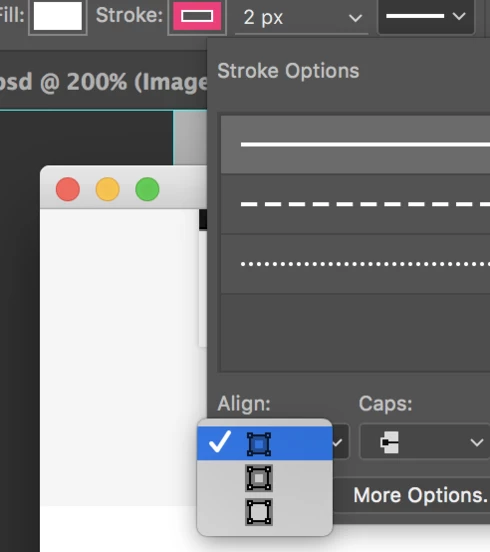


Device:
iMac 4K Retina
Photoshop CC (2015.5) - Updated June 23, 2016

This topic has been closed for replies.

26 replies

Participant
November 3, 2016
I can confirm the bug is fixed for me. Great! 😄
Legend
November 2, 2016
Inspiring
November 2, 2016
Guys! Today the 2017 version of Photoshop was released. It seems like the bug was fixed! Hooray!
Legend
October 17, 2016
Yes. It should be.
Inspiring
October 17, 2016
Meaning the bug is squashed for good? Please remember this also affects Generator, and since generator is ESSENTIAL on my day-to-day use-cases, having it partially fixed does not help. Especially since adobe is taking over six months to fix outstanding issues like this.
Legend
October 17, 2016
Thanks. I've confirmed your file also renders correctly in the update that will go out in the very near future.
Inspiring
October 14, 2016
Hey Jeffrey,
The link was on the above post, but here it is again.

https://www.dropbox.com/s/b81uc5yzuawgvsi/Stroke-Issue.psd?dl=0

Cheers!
Legend
October 11, 2016
Hi Vladimir, I believe I we have a fix ready for our next update. Could you share your file and I could validate that it's fixed?
Inspiring
October 11, 2016
Good to know. I'll try 2015.
Inspiring
October 11, 2016
That's what I did. 2015.5 does NOT work, but 2015 works fine. Had no option but to downgrade.