
Inspiring
June 23, 2016

P: Disappearing strokes in paths/shapes

  • June 23, 2016
  • 26 replies
  • 1640 views

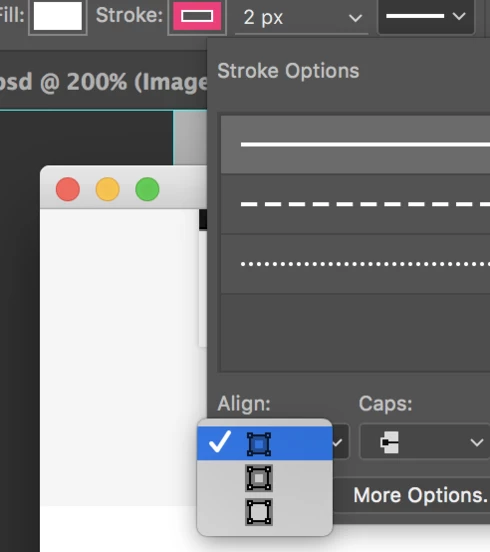
I updated to the most recent version of Photoshop CC (2015.5). I noticed that the strokes in compound paths/shapes are suddenly disappearing. Sometimes I need to toggle different modes of stroke alignment in Stroke Options for the stroke to appear again.


Device:
iMac 4K Retina
Photoshop CC (2015.5) - Updated June 23, 2016

This topic has been closed for replies.

26 replies

Inspiring
October 11, 2016
What about downgrade? Not solution, but you could work.
Inspiring
October 11, 2016
My graphics work is nearly dead-in-the-water with this bug. Absolute showstopper.
Inspiring
October 7, 2016
Any update to this issue? This is seriously affecting my use-cases with Photoshop, as it also affects generator.

Here is an example file I have that photoshop renders wrongly 100% of the time in my Windows 10 PC:

WRONG                                                CORRECT
          VS         

I have uploaded this PSD to dropbox so anyone can check it out and see if it happens to their setups as well:
https://www.dropbox.com/s/b81uc5yzuawgvsi/Stroke-Issue.psd?dl=0


I'll list below the specs of the computer I'm working on:
CPU: Intel Core i5 6400
GPU: Intel HD Graphics 530
RAM: 16GB DDR3
OS: Windows 10 Home x64 (anniversary build)
Photoshop Version: 2015.5.1 (20160722.r.156 x64)

I'll also add that I've tried the following:
  • Uninstalling photoshop
  • Uninstalling creative cloud entirely
  • Uninstalling and cleaning using the Adobe CC Cleaner tool
  • Updating ALL drivers
  • Changing PCs (suspecting vídeo card incompatibilities)
  • Formatting my Windows 10 PC and reinstalling everything from scratch

The problem just does not seem to go away. Very very frustrating.

Participant
August 21, 2016
Yes you are seeing the correct design.

I just tried this file on my home iMac. The result is pretty strange. On my office iMac, the strokes disappeared every time. It's consistent.

But on my home iMac, they acted pretty random. Sometimes strokes disappeared upon opening, sometimes not. Edit the path will cause the stroke disappear and reappear randomly. Sometimes the stroke did not represent the path correctly.

I recorded a video about the editing process:
download

iMac 27 OS X 10.11.6
Photoshop CC 2015.5.1
Legend
August 19, 2016
Yes. Seems to have the secret sauce to at least reproduce a rendering difference. I've logged a report for our engineers to look into. Thanks!
Inspiring
August 19, 2016
So... Is my file helpfull? Contains the file data which you need?
Please check also topic  Home › Mainline Builds › r.88 > PS ignores shape stroke 
in another forum.
Legend
August 19, 2016
Jaroslav, with your file I am able to reproduce something different with rendering between versions. Let me run this by the engineers.
Legend
August 19, 2016
I've opened the attached file. All the strokes seem to appear for me. All the camera icons have a 1pt stroke on these. The circle around the camera on the left has a 1pt stoke. The second from the left has 1.5pt stroke. The one on the right has a 1pt stroke. Is there any trick to getting any of the strokes to not appear? Do you open it multiple times and they disappear at some point?
Participant
August 19, 2016
No it won't. In my case I need to select the path, move it a couple of pixels with arrow keys then the strokes will reappear.
Inspiring
August 18, 2016
In my case not. I was able to create smart object with bugged strokes and save bugged bitmap in preview, but if you open SO in same zoom level, you will see it correctly.
Sample file: http://sklad.bereza.cz/00-jarda/cokoliv/sample-file%281%29.psd
What i saw: http://sklad.bereza.cz/00-jarda/cokoliv/2016-06-20_095240.png