
Inspiring
June 23, 2016

P: Disappearing strokes in paths/shapes

  • June 23, 2016
  • 26 replies
  • 1640 views

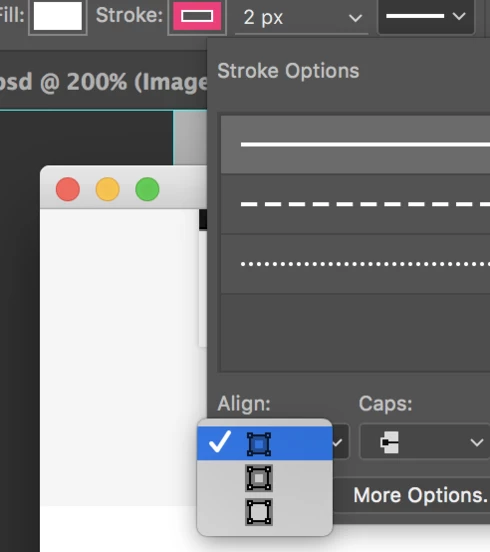
I updated to the most recent version of Photoshop CC (2015.5). I noticed that the strokes in compound paths/shapes are suddenly disappearing. Sometimes I need to toggle different modes of stroke alignment in Stroke Options for the stroke to appear again.


Device:
iMac 4K Retina
Photoshop CC (2015.5) - Updated June 23, 2016

This topic has been closed for replies.

26 replies

Legend
August 18, 2016
If you open the file and it's missing strokes, does selecting View > 100% show the strokes correctly at 100% (actual pixels)?
Inspiring
August 18, 2016
Same problem... but it is rare in my case. 
I reported this bug on Jun 15, 2016, 5:04 PM with Bug ID - 4164812 and with sample file and screencast video in prerelease testing.

State: Closed
Status: Deferred
Inspiring
August 18, 2016
The same thing is occurring for me after updating to Photoshop CC 2015.5. Really sucks because I use strokes for a lot of things within designing interfaces. They are a more user-friendly way to apply and change strokes to shape elements than a layer style is.

It seems like it is happening with clusters of shapes in a file, and not individual ones in a group on their own. See the below.

File before saving showing the strokes (I had to work some magic to get them all to reappear).


File after saving, closing, and reopening - Shape Strokes disappear again.


Device: MacBook Pro (Retina, 15-inch, Mid 2015), Photoshop CC 2015.5
Inspiring
August 3, 2016
I have been having the same problem.

It seems to happen more if i have combined several shapes. The strokes will suddenly disappear.

Occasionally they will reappear if I duplicate the layer or re-apply the stroke but they will usually go again if I try to edit the shape.

This used to work fine before but it seems to have started after the last update. 

Device: iMac on El Capitan, Photoshop CC 2015.5
Inspiring
July 20, 2016
Have also been experiencing this bug

Changing the stroke location; outside, inside, center will make it reappear. On document open, many strokes are missing.

Device:
Photoshop CC 2015.5
Mac Pro (Early 2009)
Participant
June 29, 2016
I have same problem here.

For me, some shape strokes disappeared after reopen the document.
If I edit the shape the strokes reappeared.
But if I save and reopen the document, they disappeared again.

Here is a sample file with problem: download

iMac 21, Photoshop CC 2015.5