


Inspiring
November 22, 2016

P: Displacement Bug (Could Not Complete Request Because of Disc Error)

  • November 22, 2016
  • 23 replies
  • 1382 views

Photoshop CC 2017 -Displacement Effects can neither be applied nor modified.
This will result in the following error screen, no change can be made.
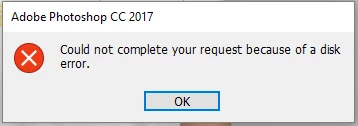


I have changed the physical disc out, yet the bug still persists. CC 2015.5 did not yet show it.

I have some error logs, if anybody is interested.

This topic has been closed for replies.

23 replies

TheOldBen
Participating Frequently
December 13, 2016
Much obliged!
Participating Frequently
December 13, 2016
Ah, right. I see that now. In CC 2015.5 (and lower) you'd get the Displace dialog and be able to replace the map file when saving the smart object. I'll add this case to the bug so instead of the error, you will at least be prompted so you can replace the map file.

Thanks for updating with this case!
TheOldBen
Participating Frequently
December 13, 2016
I get the error when editing the smart object and then saving the changes. 
The displacement filter dialog bug has successfully been fixed.
Participating Frequently
December 13, 2016
When do you get the "file could not be found" error? I see it if I toggle visibility for a displacement filter with a missing map file, and already have a bug open for this. The expected behavior should be the same as 2015.5 and earlier where you were prompted with the displacement filter dialog and could then select a new map file. 

I tested with the file you provided and was able to replace the map file by double-clicking on the filter.

Thanks,
Eric
TheOldBen
Participating Frequently
December 13, 2016
Turns out, this has something to with the old file names. 

If I save said Smart Objects under different names and then place them anew, everything works again, as it should

If you have a delicate placement of your object, like when it is skewed or warped into perspective and you run into this problem, this worked for me:

I saved the old, embedded Smart Object as a PSB (they already were PSBs, since this is the only format that allows transformations to be allowed on the Smart Objects, just wanted to make a note of that potential pitfall)

I switched the old smart Object from embedded to Linked with the Convert to Linked.. command (right click on the layer, NOT on the thumbnail to get the layer menu)

I relinked to the file I had saved in step 1 (right click on the layer again, chose  Relink to File...)

You now have a Smart object linked to the new file that will save normally.
If you want to embed it again, right click the layer and chose Embed Linked...

And that should put things as they were before. Maybe not ideal, but certainly workable.


TheOldBen
Participating Frequently
December 13, 2016
Excellent! This makes it possible for me to edit the displacement filter and add a new displacement map! Excellent job, and so quickly, too! Kudos.

Unfortunately, I still keep getting the update errors on the smart object,  which is supposed to get the displacement treatment. I will open a new thread for this, if you think this issue is  solved.


Legend
December 13, 2016
Please install today's CC 2017.0.1 update, as it should address this issue: http://blogs.adobe.com/photoshop/2016/12/photoshop-now-supports-touch-bar-on-the-new-macbook-pro.htm...
Inspiring
December 12, 2016
Ok, definitely would be most ideal to have that zapped with the next round of bug fixes in the next update. Thanks for this note.
Legend
December 12, 2016
Looks like it's slated to be in our next update in the very near future.
Inspiring
December 12, 2016
Been having the same issue as Benjamin and have been having it ever since the update to CC '17. Any updates?