

P: Does not recognize full memory (RAM) - Windows
Hi,
I have updated Photoshop to the latest version (Photoshop 2021 v22.4.0.195) and it does not recognize full memory (RAM) on Windows 10 (20h2).
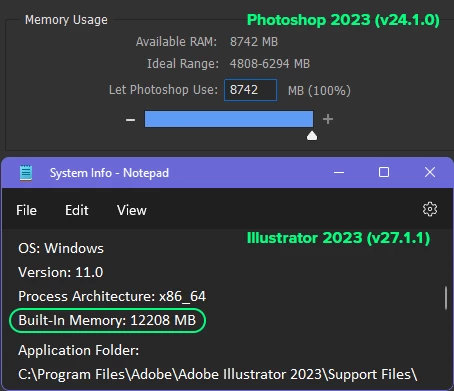
I have 12GB ram and it recognizes just 8GB of it!
Both Ps and Windows are x64 and are updated, also graphic card is updated. I didn't have this problem in previous version (22.3).
Update (29.12.2023): I am not a genius like Adobe, but I am idiot enough to understand there's nothing wrong with my Os, it's something wrong with my Ps! Unlike Adobe, I'm not rich. I don't have enough money to afford a new system or even a RAM module! Please address this rubbish, ridiculous mess!


 AdChoices