

TenTin
Known Participant
May 14, 2021

P: Does not recognize full memory (RAM) - Windows

  • May 14, 2021
  • 32 replies
  • 5675 views

Hi,

I have updated Photoshop to the latest version (Photoshop 2021 v22.4.0.195) and it does not recognize full memory (RAM) on Windows 10 (20h2). 

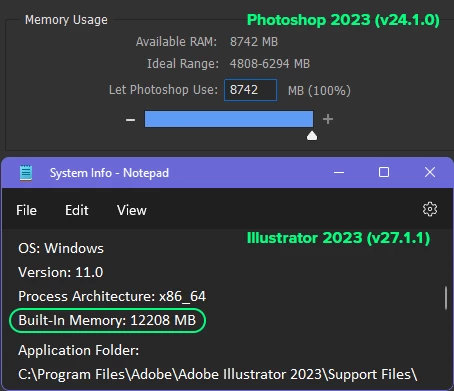
I have 12GB ram and it recognizes just 8GB of it!

Both Ps and Windows are x64 and are updated, also graphic card is updated. I didn't have this problem in previous version (22.3).


Update (29.12.2023): I am not a genius like Adobe, but I am idiot enough to understand there's nothing wrong with my Os, it's something wrong with my Ps! Unlike Adobe, I'm not rich. I don't have enough money to afford a new system or even a RAM module! Please address this rubbish, ridiculous mess! 
 

This topic has been closed for replies.

32 replies

TenTin
TenTinAuthor
Known Participant
May 19, 2021

Ps version v22.4.1.211 is released.. I'm going for it to check it out!

Known Participant
May 19, 2021

So why is this approximation different from all previous PS versions? All previous versions detected nearly 30GB of 32GB that my system has. This version "detects" about 25GB.

Known Participant
May 19, 2021
I happen to have a few versions of photoshop installed...

Above is PS 22.4

Another:

Above is 21.2.5

And going awhile back...

Above is 20.0.9

As you can see the "available ram" is consistent throughout until we get to the latest version. This change occurred with 22.4. I don't know if its a true bug or even a problem (I haven't used 22.4 strenuously yet) but it is absolutely inconsistent with prior versions.

Dramenon
Community Manager
Community Manager
May 19, 2021

Because it is an approximation of what is available at the time one launches Photoshop, it may or may not be exactly the same. It's not impossible for it to be the same or nearly the same.

In most cases, whether the number is +/- 10% it is not going to make a difference. Once you find the balance of how much RAM to allocate with how you want your application to perform, you should not need to change it or worry about it.

In general making the "amount available to Photoshop" bigger will improve Photoshop performance for some customers, but may also reduce performance of the OS and other applications. It is a balance.

And despite what others may post, it is not a bug.

/end of line/
Known Participant
May 19, 2021

@dramenon 

It does not change from session to session. I can launch photoshop right after boot or while many other things are running and it still reports the same amount.

This issue has come up before, was a bug and was fixed.

Inspiring
May 19, 2021

@dramenon Thx for the clarification, although I still have the exact same available RAM number as my screenshots I posted above. Shouldn't it be different if it was an aproximation from session to session ? I'm quite sure my actual used RAM is different from the previous session but PS still calculate the same amount discrepencie between 22.4 and 21.2.8

TenTin
TenTinAuthor
Known Participant
May 19, 2021

Really! Before the update Ps could estimate exact amount of the RAM!!.. (It could estimate exact 11.9 GB of installed RAM in all previous versions but now it just identify(!) 8.7 GB of it, and shows 11.9 GB in SysInfo).

I am not engineer and a geek but as my knowledge says it could be a programming bug! I have changed the RegKey in Win OS to override physical RAM reading by Ps but nothing!

Dramenon
Community Manager
Community Manager
May 19, 2021

The "amount available to Photoshop" is an estimation based on a verity of factors given to Photoshop by the operating systems. That estimate can be a challenge with many per-platform differences over the years. 

It is not meant to be an exact match from session to session, it is an approximation of what is available at the time one launches Photoshop. Photoshop can not make it stay exactly the same every time. 

/end of line/
TenTin
TenTinAuthor
Known Participant
May 19, 2021

It also shows the correct amount of RAM in "System Info..." ("Built-in Memory" section). It's not a display glitch(!) it is a technical glitch because Ps is using just 10 GB of my 12 GB RAM!

Known Participant
May 18, 2021

So I just noticed in the efficiency indicator at the lower left of the window it shows the correct amount of allocated RAM (what performance preferences used to display before 22.4) when set to "Scratch Sizes". Maybe what the preferences panel is displaying is inaccurate?