

Inspiring
June 23, 2014

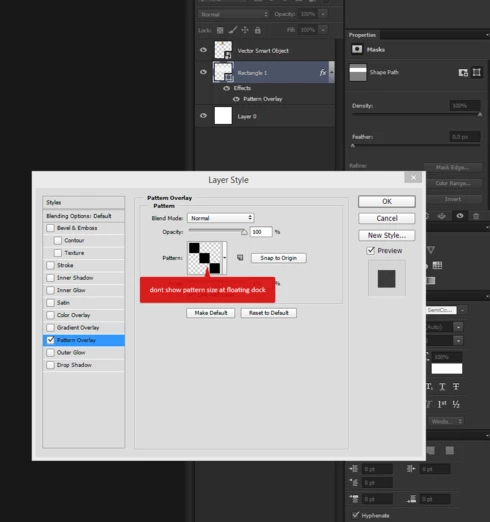
P: Doesn't show pattern preset size in tooltip

  • June 23, 2014
  • 25 replies
  • 403 views

Photoshop cc 2014 dont show pattern size at floating dock
Windows 8, Photoshop cc 2014

In Photoshop сs6 everything works well
This topic has been closed for replies.

25 replies

Legend
December 15, 2014
Engineers are looking into this.
Inspiring
December 15, 2014
yes, please!
Inspiring
September 30, 2014
Fixing this would be super: PS CC 2014.
Inspiring
September 20, 2014
Same issue here using: PhotoShop CC 2014
Very frustrating
Inspiring
September 20, 2014
I do not see this solution in PhotoShop CC 2014
Inspiring
August 14, 2014
Please resolve, this is immensely frustrating on a daily basis. Thanks for the stopgap, David.
Known Participant
July 24, 2014
Same issue here only when I use the panel in adding a layer style. If I go the other route to Edit>Fill and select pattern, the tooltip is displayed from that panel.

The same is seen for the swatches panel, the custom shapes panel, and when selecting the gradient panel from the toolbar. The tooltips seem to display only from the panels other than when using the layer styles or a fill/adjustment layer from the layer panel when applying it to the selected layer. So there no tooltips or info tag shows up when accessing this from the layers panel.

The inability to see the tooltip has us going in reverse and working a different route that is a tad slower. I've looked in the Preferences as well as Panel Options in the layer panel and the Menus under the Edit tab (way at the bottom list) but no luck on finding a way to turn this on; not sure that it can be turned on.

Is there a fix for this yet?
Participant
July 24, 2014
I made duplicate topic, sry anyway, please resolve this problem soon as possible.
Inspiring
July 19, 2014
Adam,

Thanks! It's an extra step from what was previously necessary but definitely worlds better than manually dragging guides or marquees. This'll save the team tons of time.
Participant
July 19, 2014
I found a work around, not as quick and easy as the tooltip feature we are all used to, but if you click the Pattern Stamp tool and then in the upper toolbar you can then choose the pattern you need dimensions for and the tooltip will show up in that pattern picker.
