idanarbel
Participant
June 28, 2015

P: Duplicating layers/groups in artboards moves to the top of artboard and not original layer

  • June 28, 2015
  • 34 replies
  • 1093 views

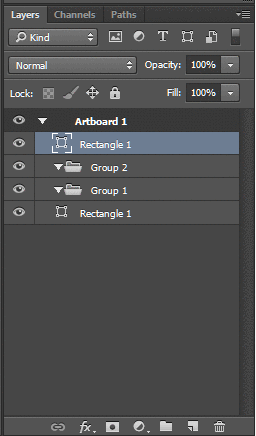
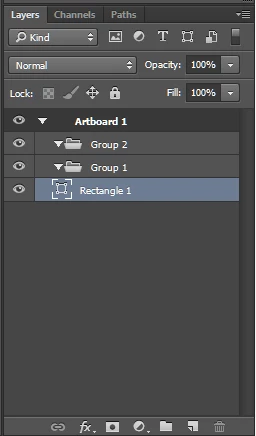
Problem with artboards and layers in photoshop cc 2015, when you duplicate a layer or group inside an a group in an artboard, the new layer is placed at the top of the artboard and not next to the original layer.

This topic has been closed for replies.

34 replies

Participant
September 19, 2015
Yes please. Agree. New layers at the bottom of the group.
Participating Frequently
August 26, 2015
Although you can improve the productivity of this tool:
-master artboard (for recurring elements). Rather than duplicate smart objects on each page.
-Support for pages at 300dpi. (Sometimes we have a business card, web pages 8 and a poster). Having everything in one file would be incredible.
Participating Frequently
August 26, 2015
More problems:
-Generator Not work well with work tables. With multiple artboards and vector layers, cut the asset generated.
-In SmartObjects, Generator generates assets into temporary folder. Example: C: \ Users \ x \ AppData \ Local \ Temp \ smartobject01-assets
Inspiring
August 14, 2015
Please, put some checkbox in the Preferences / Layers panel options, which enables the old behaviour - the layer placed in group goes on the bottom. Thanks!
Inspiring
August 4, 2015
Just tested... it has been fixed. Thank you so much Jeffrey for being our advocate and keeping us informed. This has made my day!
Legend
August 4, 2015
This issue should be corrected in the Photoshop CC 2015.0.1 update which was released today. Details here: http://blogs.adobe.com/crawlspace/201...
Inspiring
August 3, 2015
Yes, for me the new behaviour is extremely useful and it's how I would have hoped it to be from the beginning. But the old behaviour is useful as well and I can understand how it breaks everyone's flow (including mine sometimes) not to have it. Having both is the best option and if need be, the new one can get the modifier key, still very much worth it.
Inspiring
July 26, 2015
Also having the same issue. How the heck do I follow this thread without having to re-search it next time (or get updates from this thread without having to check back daily)?
Inspiring
July 22, 2015
Yes please fix this. I found this tread trying to find out if there was a setting to have it go back to the original behavior of duplicating next to the item you have duplicated. This is very annoying for sure, especially for files with many layers as others have pointed out.
Inspiring
July 17, 2015
For me it also happens when I try to duplicate a group with Cmd+J it's duplicated in the document, outside of the artboard.