idanarbel
Participant
June 28, 2015

P: Duplicating layers/groups in artboards moves to the top of artboard and not original layer

  • June 28, 2015
  • 34 replies
  • 1129 views

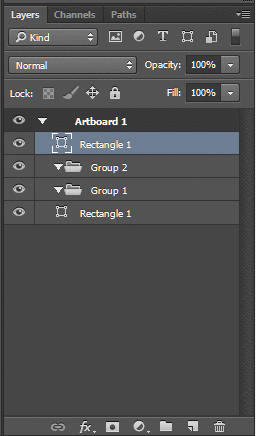
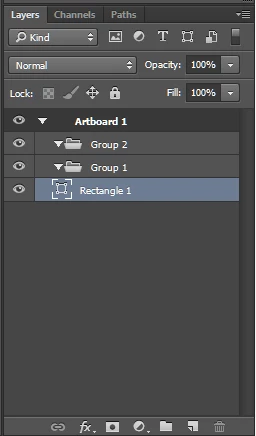
Problem with artboards and layers in photoshop cc 2015, when you duplicate a layer or group inside an a group in an artboard, the new layer is placed at the top of the artboard and not next to the original layer.

This topic is closed to new replies. Start a new post to keep the conversation going.

34 replies

robertpaige
Participating Frequently
July 16, 2015
I second that too.
Inspiring
July 16, 2015
It won't help, if I have to copy a lot of layers from _another_ document.
Inspiring
July 16, 2015
What if you have over 70 layers in an artboard? Who in their right mind would want to do that?
Participant
July 16, 2015
Yeah I agree. This bug literally makes me want to avoid using Photoshop all-together. I wish I was kidding.
Inspiring
July 16, 2015
This could easily be solved by allowing Cmd+drag if a user wishes to replicate previous behavior...
robertpaige
Participating Frequently
July 15, 2015
Please don't look into it. Fix it. I beg you.
Inspiring
July 14, 2015
Glad I'm not alone.. revert to old behaviour please!!! losing valuable seconds re-ordering layers all the time!
Participant
July 14, 2015
Same problem here with duplicating a layer and having it appear on top of the artboard, not next to the layer or group that I have just duplicated. It seems small but duplicating is such a basic action, having to spend time rearranging layers, over the course of an entire day, really adds up to lost productivity.
Inspiring
July 13, 2015
The bigger problem: if you copy multiple layers from another document into the one with artboard, sometimes it spreads the layers into several artboard.
Inspiring
July 11, 2015
This, exactly. Every time I try to move around a layer, the view position of the layer palette adjusts so the moved layer is at the top of your view and it's driving me absolutely NUTS! It's making me feel crazy because if I'm moving a layer up just one spot and it's towards the bottom of my the view, suddenly it's at the top and I've completely lost track of where I am. It's messing up my work flow and productivity. I cannot think of a single reason why this would be a good idea, please fix this or at least give us the option to turn it off!