idanarbel
Participant
June 28, 2015

P: Duplicating layers/groups in artboards moves to the top of artboard and not original layer

  • June 28, 2015
  • 34 replies
  • 1129 views

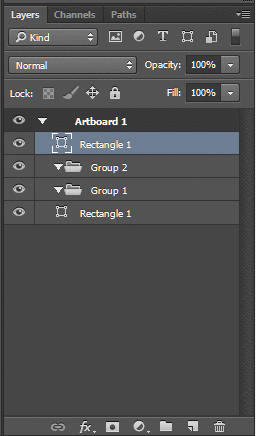
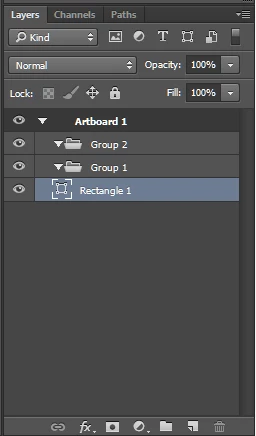
Problem with artboards and layers in photoshop cc 2015, when you duplicate a layer or group inside an a group in an artboard, the new layer is placed at the top of the artboard and not next to the original layer.

This topic is closed to new replies. Start a new post to keep the conversation going.

34 replies

Participant
July 10, 2015
Yes this is absolutely obnoxious. This absolutely must be fix. To me and my team this is a huge suck out of our workflow and productivity. At least provide a workaround in the meantime until a solution can be solved.
robertpaige
Participating Frequently
July 8, 2015
I get sea sick doing that.

There needs to be an easier way to duplicating a layer to a different artboard!
jaredbooye
Participant
July 8, 2015
Just glad that I am not the only one going crazy over this.
jaredbooye
Participant
July 8, 2015
How do I get this update. I dont see it.
Participant
July 8, 2015
Upon further inspection, it seems that the Opt + Drag shortcut for duplicating a layer makes this repositioning happen regardless of layer type!
Participant
July 8, 2015
I noticed today that the duplication issue of moving the layer to the top of the stack has been addressed (silent update?), however there's still an odd behavior happening with the Layers palette.

This applies to text layers as well as folders, but when you duplicate the text layer or group, the entire frame/scroll bar position of your layer palette shifts to make the duped layer positioned to the top. This duplication action **does not** affect the layer order, just the view position of your layers palette.

Just thought I'd call it out as it's a bit confusing and interruptive.

Thanks for the duplication order fix, however!
Inspiring
July 8, 2015
Same problem here, it's getting a bit annoying. I love the artboards it's a timesaver for me, but I'm losing that time again when duplicating groups and layers by constantly having to replace them to their correct position in the layers panel.
Legend
July 7, 2015
The behavior when you drag a layer into a group for it to go to the top is intentional, but I don't think it's intentional when duplicating a layer. Will look into it.
Inspiring
July 7, 2015
I'm really hating this. My PSDs are normally 50+ layers and the new duplicating layer behavior ads so much more production time to keep my layers organized properly. Please revert to the old behavior and keep the duplicated layer on top of the source layer.
idanarbel
idanarbelAuthor
Participant
July 5, 2015
I can get used to having the new layer placed in a group be placed at the top, it event makes a little bit of sens ...but when i'm working on a layer in the middle of a huge document 4 groups deep and I duplicate it and the duplicated layers appear at the top of the artboard that just devastating!