idanarbel
Participant
June 28, 2015

P: Duplicating layers/groups in artboards moves to the top of artboard and not original layer

  • June 28, 2015
  • 34 replies
  • 1129 views

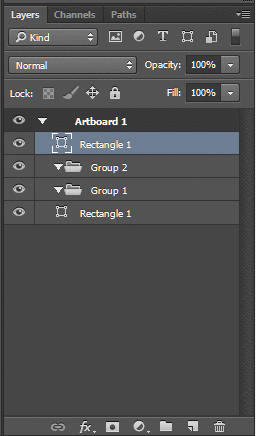
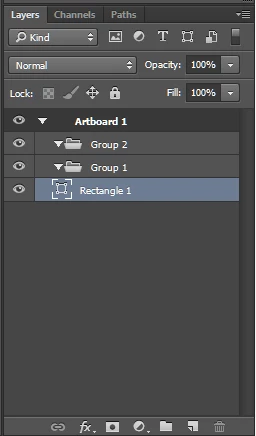
Problem with artboards and layers in photoshop cc 2015, when you duplicate a layer or group inside an a group in an artboard, the new layer is placed at the top of the artboard and not next to the original layer.

This topic is closed to new replies. Start a new post to keep the conversation going.

34 replies

Participant
July 2, 2015
its ok if there is an option revert... but having used the same action over and over again for years and suddenly its different, you wonder what the reason was... does it improve workflow? not really. has it sped anything up or made life easier? not really... be good to know the rationale for the change.. hey, maybe we've been doing it wrong all these years...

or is it a bug?
Inspiring
July 2, 2015
I'm frustrated with the new workflow of adding a layer to a group and having it at the top vs. the bottom as Gary Haslam mentioned. "If it ain't broke ..."
Participant
July 2, 2015
I'm uncertain if this is a bug or an intentional change to the behavior of the layers palette, but it's unwanted either way.

It's a big obstacle in workflow. Would love this fixed/reverted back to it's original behavior.
Participant
June 30, 2015
I have the same issue with the arrangement of layers.... also when you used to drop a layer into a group folder, it would go to the bottom of that group, now it sits at the top.