


Inspiring
November 7, 2020

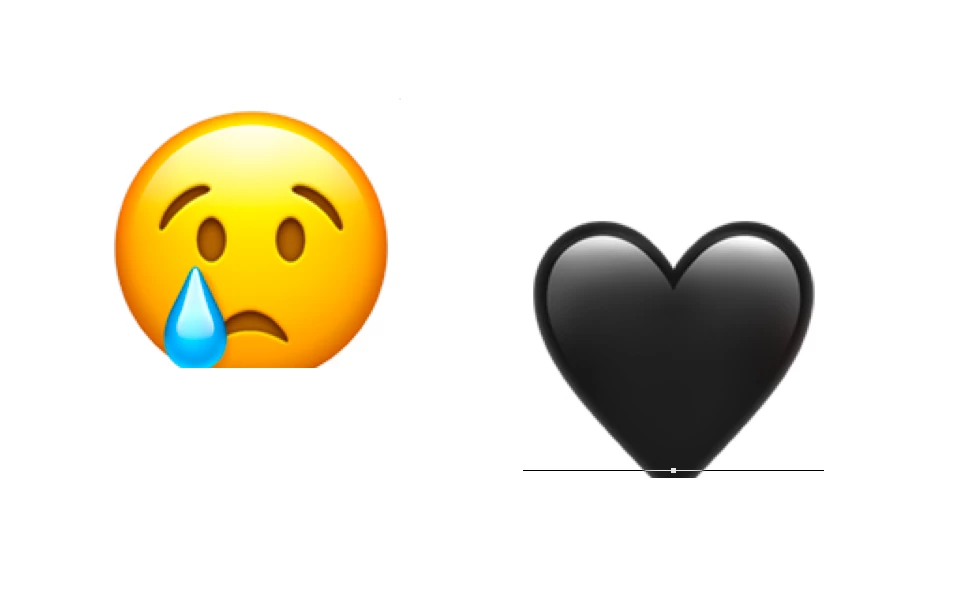
P: Emoji glyphs being trimmed below baseline (macOS Big Sur)
  • November 7, 2020
  • 29 replies
  • 2695 views

Hi, I have been having this issue for a while now...it's been an issue on Photoshop 2020 and now on 2021 as well. Bottoms of emojis are being cut off, I have tried changing the baseline shift and other Character settings but nothing seems to fix it. I am running the macOS Big Sur public beta (11.0.1) and Photoshop 22.0.0. From what I can tell a solution used to be turning on Legacy Compositing under Performance settings but it seems that option has been removed. I appreciate any help!

This topic has been closed for replies.

29 replies

Inspiring
April 7, 2021

Same problem here macOS Big Sur 11.0.1, Photoshop 22.3.0

Participating Frequently
April 5, 2021

Having the same problem with the emojis cutting off.  Also running Big Sur with up to date PS.

Inspiring
March 23, 2021

Got the same problem!

Copying helps, but that not how it should works🤬😬

Photoshop 22.0.0 Big Sur 11.2.3
Lodimup
Participating Frequently
March 21, 2021

Seriously, why isnt this fixed yet?

Participant
February 20, 2021

FWIW, none of the workarounds posted here work for me including *j_tippmann who is using all the same OS/software versions as I am.

I once (just once) got an emoji to appear properly after adjusting its size but I cannot reproduce it. Really frustrating bug. Personally, I have to copy/paste from Emojipedia's PNG versions and that's so much more work and of course not editable.

Inspiring
February 20, 2021
Same problem here, are there  any news about the problem?
I'm on Big Sur 11.2.1 and Photoshop 22.1.0, same problem exists with Illustrator and InDesign.
Here is my small workaround, after finishing text edit, click on the move tool and copy/paste the symbol, now it seems to be ok.
Another workaround I found, after finishing the work, you could resize the canvas by 1 px and then resize it back, now the symbols are shown correct.
Here is the same picture as above after resizing the canvas.
 

Inspiring
February 19, 2021

Any news on this? Thanks!

Vinod Balakrishan
Adobe Employee
Adobe Employee
February 10, 2021

I don't this problem anymore on Mac OS 10.15.17

Inspiring
February 9, 2021

Any progress on this? I'm having this issue with Photoshop 2021 (v22.1.1) on my Mac running Big Sur, but not on Catalina.

Inspiring
January 15, 2021

For those who are waiting the bug to be resolved I've found a very dirt workaround.
After you insert the emoji, under "Transform" click the "mirror" button vertically and horizontally.

After few turns the Emoji is fully rendered and is not cut anymore.

I'm on Photoshop 2021, Big Sur, Mac M1.