


Inspiring
November 7, 2020

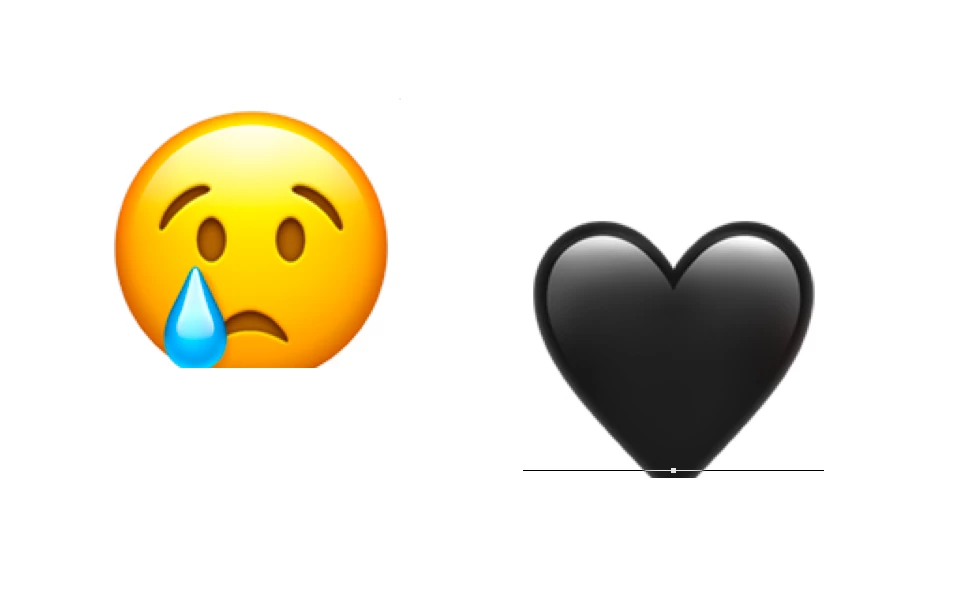
P: Emoji glyphs being trimmed below baseline (macOS Big Sur)
  • November 7, 2020
  • 29 replies
  • 2695 views

Hi, I have been having this issue for a while now...it's been an issue on Photoshop 2020 and now on 2021 as well. Bottoms of emojis are being cut off, I have tried changing the baseline shift and other Character settings but nothing seems to fix it. I am running the macOS Big Sur public beta (11.0.1) and Photoshop 22.0.0. From what I can tell a solution used to be turning on Legacy Compositing under Performance settings but it seems that option has been removed. I appreciate any help!

This topic has been closed for replies.

29 replies

Inspiring
January 11, 2021

Any progress on this issue? I am still having it.

Inspiring
December 8, 2020

I don't know the answer as to why but have found a workaround (for now). I've been saving the emojis out of keynote as a PDF and opening the file in AI to use in Adobe. Hope that helps!

Inspiring
November 18, 2020

I am having the same issues. It only happens with Apple Emoji.

Vinod Balakrishan
Adobe Employee
Adobe Employee
November 16, 2020

Does it happens with both AppleEmoji and EmojiOne fonts? If it happens only with AppleEmoji, Apple might have updated the font recently.

Legend
November 16, 2020

Yep. Can confirm. I'll have engineering take a look. Thanks!

Participant
November 14, 2020
Same behaviour here on 22.0.0. Catalina was fine, this only happened after update to Big Sur.

Legend
November 13, 2020

Very strange. On Catalina, when I open the file it wants me to update the text and the cut-off goes away for the text layer. Installing the final release of Big Sur on my other Mac presently. Will check it when it's done.

Inspiring
November 13, 2020

Hi, sorry for the late reply! Here is a CC link: https://shared-assets.adobe.com/link/f9cd3bf6-d4fd-4c71-775d-dfbb9d93d76f

Legend
November 9, 2020

Can you post a .psd (dropbox, CC files) that exhibits this behavior?

I wasn't able to repro.