


Inspiring
January 16, 2012

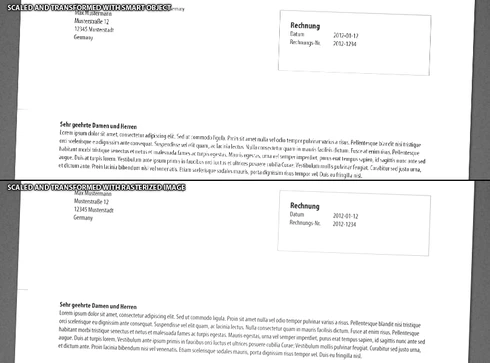
P: EPS or PDF Smart objects render badly (with jags) when being scaled or transformed.

  • January 16, 2012
  • 70 replies
  • 1118 views

Like the title says.
Smart objects render badly (with jags) when being scaled or transformed.
There are stair-like jags on the edges and text looks like crackled.
This topic has been closed for replies.

70 replies

Inspiring
October 29, 2014
Other users are not seeing this problem in Photoshop CC or CC 2014.
Angus_Hume
Participating Frequently
October 29, 2014
I've only just started using Photoshop CC and testing CC 2014 and I still see this problem in both versions. I'm copying a raster/vector object from InDesign CC and pasting into Photoshop. I have been doing this for ages in Photoshop CS5 with InDesign CC and it works perfectly for web work. In both versions of Photoshop CC the pasted smart object is slightly jagged. The problem is definitely the lower quality rasterisation of the initial paste compared to CS5. Anti-alias is checked on when pasting however further testing shows that what I am seeing is that in Photoshop CC and Photoshop CC 2014 the anti-alias checkbox is not working. Checking it on or off makes no difference and in fact if I swap over to CS5 and turn it off I see exactly the issue I get in CC with it on.

Edit: Just to clarify the anti-alias checkbox is making no difference for the image component of the smart object, but it does make a difference for the vector part.The pasted image IS anti-aliased just not as well as CS5 and the checkbox makes no difference in CC to the image.
Inspiring
November 13, 2013
Hi. Yeah. I'm running CS6, not CC. I've made a smart object out of a type layer and when that's rotated, it gets completely jagged. Running Mac OS 10.9. But it's been like this with CS6 for a long time, prior to this OS. I've had to rasterize everything before going final with images (web design).
Inspiring
June 26, 2013
PDF, EPS and AI files use the interpolation inside AGM, our shared technology rasterization engine (same as used in AI, ID, Acrobat, etc.). There aren't many parameters for it other than on and off.
June 26, 2013
Yeah, that seems like a good idea, given the focus on Smart Objects now.
I imagine it is more fun to invent new toys than tweak old ones though.

I notice Interpolation preferences don't effect the PDF sourced Smart Objects. What setting are they locked to (behind the scenes)?

ps. Non destructive RAW Smart Filters = amazing. Spot healing, radial gradient areas, camera shake removal... all WOW additions. Congratulations on some wonderful additions to Photoshop CC. Rounded Shape editing is a REAL timesaver. I've already found the new RAW editor to be smoother than Lightroom CC (at least for spot removal)! Can you update Lightroom to be as smooth? Hmmm, reminds me I have an enhancement idea. I'd better find the correct place to post that!
Inspiring
June 26, 2013
Bicubic should be fine (and better looking overall).

At some point I'd like to expose some of the inner values used to render smart objects, that are currently picked up from defaults. But there always seem to be bigger priorities...
June 26, 2013
Thanks Chris, I can confirm it is Interpolation setting related.

Photoshop CC ships with (global application) Preferences for Image Interpolation @ Bicubic Automatic. This setting defaults placed TIFF & PNG (and likely other) raster file placements (as smart objects) with "Bicubic Sharper" settings. This adds the (horrid) edge enhancement.

You cannot change this Interpolation per Placed File, nor can you adjust the Interpolation of the Smart Object after placing it. So you must reset your Photoshop Application Preferences each time you want a different result.

I've set my preferences to Bilinear to replicate the appearance of placed PDFs.
Inspiring
June 26, 2013
Looks like Bicubic Sharper - try changing the interpolation method and re-rasterizing the file.
June 26, 2013
Photoshop CC... adding halos to Smart Objects created from dragging external PNG/TIFF files into PSD? Maybe a new bug...


Is there a workaround for this one?

(ps, I've done a complete Win7 64bit reinstall before installing CC. No legacy CS exists on the machine)
June 26, 2013
Photoshop CC... adding halos to Smart Objects created from dragging external PNG/TIFF files into PSD? Maybe a new bug...


Is there a workaround for this one?

(ps, I've done a complete Win7 64bit reinstall before installing CC. No legacy CS exists on the machine)