


Inspiring
January 16, 2012

P: EPS or PDF Smart objects render badly (with jags) when being scaled or transformed.

  • January 16, 2012
  • 70 replies
  • 1148 views

Like the title says.
Smart objects render badly (with jags) when being scaled or transformed.
There are stair-like jags on the edges and text looks like crackled.
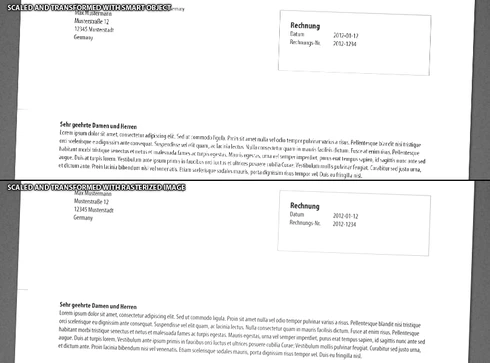
This topic has been closed for replies.

70 replies

powal1234
Participating Frequently
June 26, 2013
Chris I watched your entry in the photoshop hall of fame. It's a big honour to talk to you. Your work has enabled so much creativity. Keep up, you're a great inspiration.

Thanks again for your help.
powal1234
Participating Frequently
June 26, 2013
Seems like lots of digging in low level image processing. I believe in your conventions and code quality and hope the best for quick and simple solutions.
June 26, 2013
Unfortunately, a new bug is in Photoshop CC affects PNGs and TIFFs dragged in as Smart Objects and introduces edge brightening around dark lines. So, improvements for PDF Smart Objects - but seemingly at the cost of support for these other raster files.
powal1234
Participating Frequently
June 26, 2013
Thank you.
June 25, 2013
Powalowski, There are Smart Objects you cannot turn Anti-Aliasing off for when scaling in CC too (ie, PNG/TIFF dragged in as Smart Objects).
powal1234
Participating Frequently
June 25, 2013
Hi,
thanks for the tip. Unfortunately I have checked all of the relevant parameters. It's that I am not able to change the state of the "anti-aliasing" checkbox while transforming Smart Objects.
Will move to CC in the next days I think :)

Thanks for being so active and close to the community.
Inspiring
June 25, 2013
This issue is solved in Photoshop CC.
It only affected raster content in a vector file format (PDF, AI, EPS).

Thanks everyone for the sample files to demonstrate the problem - they were very valuable when trying to get other teams to understand the issue.
powal1234
Participating Frequently
June 25, 2013
Hujujuj... guys you like really encourage me to switching to CC.
Inspiring
June 25, 2013
The problem being discussed here ONLY applies to raster content in a PDF, AI, or EPS file.

It does not apply to raster smart objects. For those, you might have accidentally changed the default interpolation in Photoshop preferences.
Inspiring
June 25, 2013
Hmm, in my tests Photoshop CC was doing a better job than CS5.