


Inspiring
January 16, 2012

P: EPS or PDF Smart objects render badly (with jags) when being scaled or transformed.

  • January 16, 2012
  • 70 replies
  • 1148 views

Like the title says.
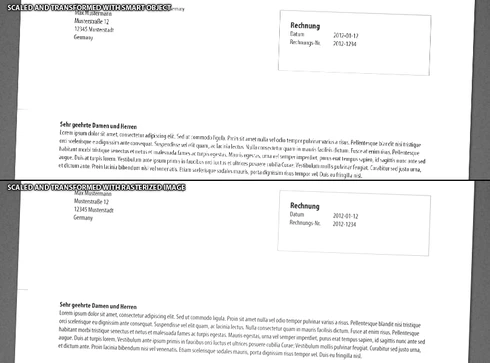
Smart objects render badly (with jags) when being scaled or transformed.
There are stair-like jags on the edges and text looks like crackled.
This topic has been closed for replies.

70 replies

June 25, 2013
I can confirm you are WRONG about this, Philippe.
Your suggestion does not help resolve issues with affected PDFs or imported artwork.
Adobe have identified there IS A REAL PROBLEM and have been working on a fix for some months.
Photoshop CC resolves the issues (of course), Though the results are still not as good as Photoshop CS5 in my initial tests..
powal1234
Participating Frequently
June 25, 2013
Maaan I cannot check it!! :-(
Any suggestion what I could have misconfigured? The checkbox for some reason is disabled.
Inspiring
June 25, 2013
Hello guys,

I've encountered the same problem only to find out it is not a bug.

- Hit Cmd + T to transform your Smart Object.
- On the toolbar on top, there now should be an "Anti-Alias" checkbox unchecked. Check it.
- Hit Enter.

Done. :)

Have a nice day!
powal1234
Participating Frequently
June 25, 2013
Recently I've been working on some text Smart-Objects and stumbled again over this bug. Made up some examples showing that it's not only about PDF or Vector Smart Objects but pretty much about PSB Smart-Objects also. The shown text is once prerastered and scaled down and once embedded as PSB and scaled down exactly the same amount.

Scaling setting to bicubic auto.


How is things going on on that Issue? Is it solved with Photoshop CC any information or experiences?

Cheers
powal1234
Participating Frequently
June 14, 2013
For me this phenomenon applies pretty much to ALL smart-objects. Especially when they're heavily scaled.. like from 14MP down to 1-2MP or something...
How is things going on at this topic?

Hope this will get fixed soon.
May 7, 2013
I'm glad it helped.
Inspiring
May 7, 2013
BTW - that file demonstrated the problem very well. It was a bug in the EPS/PDF rasterization library that caused it to not resample images correctly.
Vectorgeek
Participating Frequently
May 7, 2013
This really sucks for me because I use a lot of vector smart objects. Even exporting an Illustrator file to psd results in all the vector objects looking jagged (even type). Here I thought my eyes were getting bad.
April 30, 2013
I've installed the latest updates released this week.
Still no joy for this Smart Object smoothing issue.

Any ETA on a fix release date?
Inspiring
April 17, 2013
The problem has been identified, and a fix is in testing.