


Inspiring
January 16, 2012

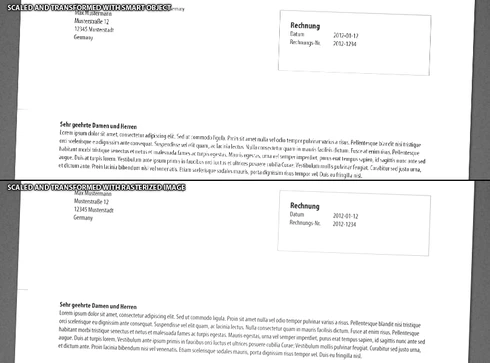
P: EPS or PDF Smart objects render badly (with jags) when being scaled or transformed.

  • January 16, 2012
  • 70 replies
  • 1148 views

Like the title says.
Smart objects render badly (with jags) when being scaled or transformed.
There are stair-like jags on the edges and text looks like crackled.
This topic has been closed for replies.

70 replies

Legend
January 17, 2013
Yeah. It may be something specific to this particular PDF. We'll figure it out.
January 17, 2013
Thanks Mr Tranberry.
I suspect the source PDFs a little (supplied by 3rd parties). Perhaps a PDF not well formatted, or locked in some way, could be to blame. Perhaps not made by Acrobat, for example.
Regardless, before CS6, I never experienced this issue.
And when some PDFs are opened in Illustrator and only some elements are copied and pasted into a PSD as a Smart Object, the same thing can occur. This too, is quite odd behavior.
Legend
January 17, 2013
Thanks Anthony. This is helpful. I'm seeing something funky here. I'm going to run my results by engineering.
January 17, 2013
Here's a link to an example PDF which, when placed or dragged into a PSD (creating a Smart Object layer), fails to be smoothed.

http://mredge.com/temp/BobJane-Demo-C...
January 17, 2013
Here's a screencast of the issue at work.
https://tfa.viewscreencasts.com/29f9f...
Inspiring
January 17, 2013
It makes a difference. But I'm just not sure exactly what you're seeing since I have yet to see a problem such as you describe.
January 17, 2013
Wow, did that work for you Chris? It certainly made no difference for me.
I used: Edit > Preferences > General > Image Interpolation > Bicubic (best for smooth gradients)

nb. When transforming smart object, "Anti-alias" is checked.

Restarted Photoshop - just in case. Still fails to smooth scaled down Smart Object created from PDF in previously posted .zip file.
Inspiring
January 17, 2013
The scaling used for SOs depends on your default interpolation -- change your default interpolation to Bicubic, then force the SO to re-rasterize (transform, or update the file)
January 17, 2013
So, open a PSD, drag in the attached PDF and scale it down to around 300px width. Apply the transform (notice no smoothing is applied when you do this).

ps, As well as Brian, all other users running CS6 in my office can replicate this problem. PC and Mac. Actually I'm yet to find anyone who can scale the PDF sourced Smart Object with smoothing in PS CS6.
January 17, 2013
You can download the same test I sent to Brian. As I mentioned, not all sources behave this way. Naturally I've installed all updates since this set of demo files was compiled. The problem persists.

http://mredge.com/temp/AdobePS_CS6_Sm...