


Participant
June 3, 2020

P: Error 205 while launching Photoshop

  • June 3, 2020
  • 51 replies
  • 18086 views

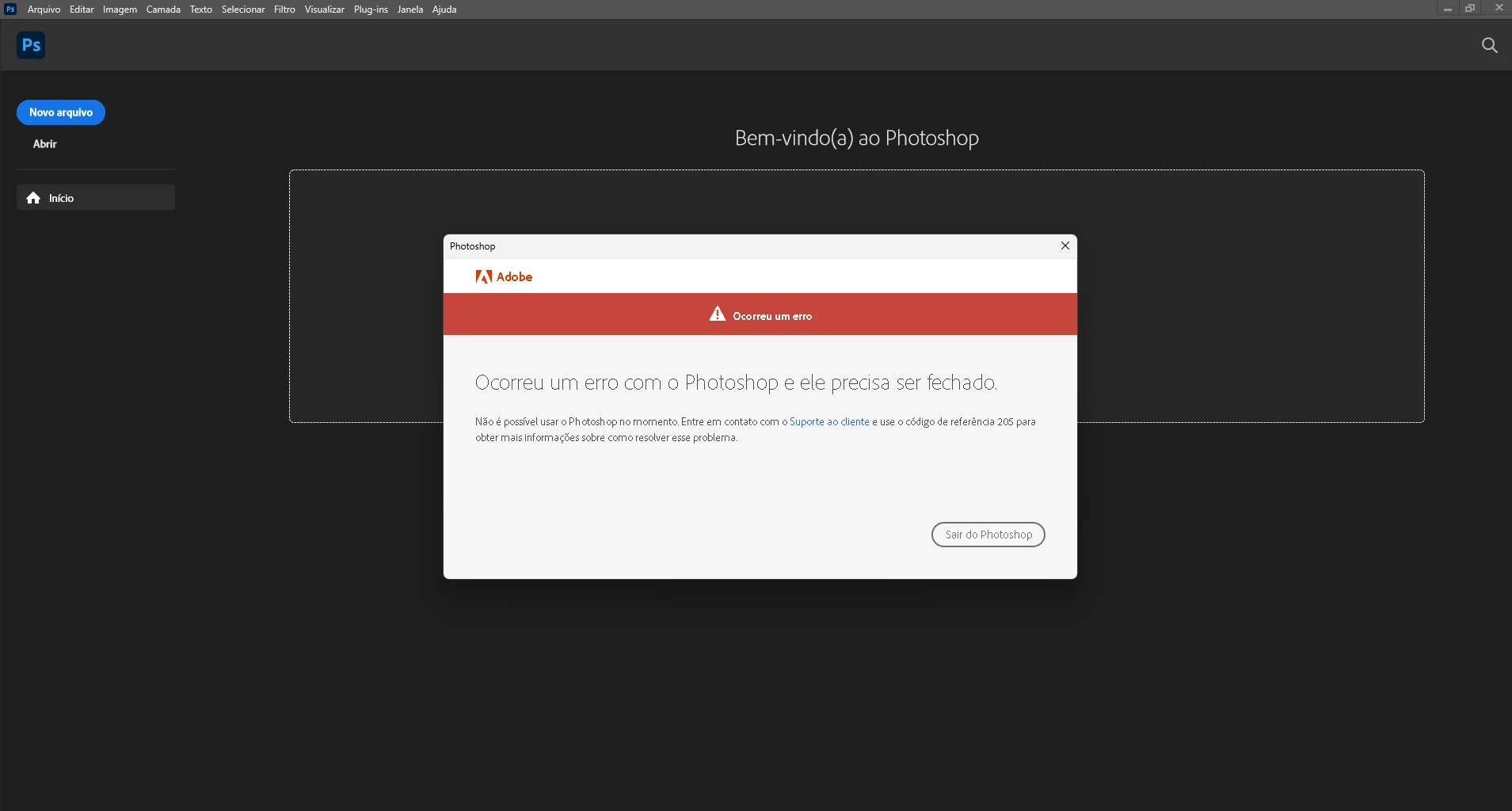
oi, toda vez que eu abro o photoshop 2022 aparece que deu o erro 205 e então fecha automaticamente, já desinstalei e instalei o photoshop. Como posso resolver esse problema
 

{Moderator Note: Edited the thread title}

This topic has been closed for replies.

51 replies

Participant
June 14, 2022

Fehlercode 205 beim Öffnen von Photoshop

Ged_Traynor
Community Expert
Community Expert
June 14, 2022

Hi

Try signing out of the Creative Cloud app and signing back in again

Alireza134
Participant
June 12, 2022

Hallo ,

Auf meinem Notebook läuft Windows 10, Version21H2. Die App Photoshop V23.3.2, Illustrator V26.31 und InDesign V17.3 sind zur Zeit nicht einsatzfähig und bekomme ich die Fehlermeldung "Referenzcode 205", die ich niergendswo auf der Adobe Seite die Lösung dafür finde. Sogar auf der Supportseite!!

Gibt es irgendwo eine Anleitung, wie man den Fehler beheben kann. Ich werde sehr dankbar, wenn irgendjemand eine Lösung dafür kennt.

MFG,

Alireza


CShubert
Community Manager
Community Manager
June 13, 2022

Hi @Alireza134, launch your Creative Cloud ap, log out and then back in... did this fix the issue?


Thank you,

Participating Frequently
June 12, 2022

Bonjour, Je ne parviens plus à accéder à Photoshop. Le code erreur est 205.

Mon pc tourne sous windows 11.

Il semble que ce problème soit consécutif à une mise à jour cumulative de windows, comme c'est malheureusement trop souvent le cas...

D'avane merci pour votre aide. 

Valérie

CShubert
Community Manager
Community Manager
June 13, 2022

Hi @Valérie011, launch your Creative Cloud app, then log out and log back in... does this fix the issue?


Thank you,

KEDI
Participant
June 21, 2022

Merci c'est parfait 👌 

Participant
June 10, 2022

Olá. Também estava com esse erro, consegui resolver fazendo o logoff da minha conta da Creative Cloud. Logei de novo e abri o Photoshop normalmente.

fuzzyfactory
Participant
June 10, 2022

The steps I followed to solve the issue:

  1. Double-check OS-Update
  2. Remove old-version-apps
  3. Restart the system
jane-e
Community Expert
Community Expert
June 10, 2022

@fuzzyfactory 


Here is the troubleshooting pages for Error 205:

https://helpx.adobe.com/creative-cloud/kb/troubleshoot-download-install-logs.html#error205


Jane


Cha Cha
Participant
June 9, 2022

I get the Error message 205 wheneven I try to open a psd file. How can I fix this? Latest version of PS CC 2022, Miscrosoft Win 10, just click open with, or double click to open the psd file. Expect the file to open without errors.

Derek Cross
Community Expert
Community Expert
June 9, 2022

Try signing out of the Creative Cloud desktop app, and then signing back in.

CShubert
Community Manager
Community Manager
May 27, 2022

Hi @jpedrodp2003, sorry you are seeing this.


I think the solution is to log out/in of the CreativeCloud desktop app, did this solve the issue?


Thank you,

mateusb23506774
Participant
June 14, 2022

Funcionou para mim também. Muito obrigado 🙂

mikeirvan1980
Known Participant
June 12, 2022

I have installed Photoshop version 23.3.2 installed. My display driver is the AMD Radeon R7 450. I now receive a popup when I open photoshop telling me to upgrade my display driver. I go to the AMD website to update it, there's no updates available so I click a link to downgrade which then leads to an error because windows wants to update to version 27.20.21003.8013 for my display driver. I alm also on Windows 11. When I open photoshop it tells me to contact customer support and reference code 205. I tried downgrading photoshop to see if this fixes the problem and it won't. what can be done to fix this? I can't use photoshop anymore because of this bug. 

thanks,

Mike Irvan

Michael Bullo
Community Expert
Community Expert
May 27, 2022

In case it helps anyone else solve this problem, I ran the text in the image through Google Translate...


Ocorreu um erro com o Photoshop e ele precisa ser fechado
An error has occurred with Photoshop and it needs to close (Portuguese)

I love it because of Photoshop and it's pretty cool (Croatian) (This is not a joke)


Não e possível usar o photoshop no momento. Entre em contato com o Suporte ao cliente e use o código de referencia 205 para obter mais informações sobre como resolver esse problema
It is not possible to use photoshop at the moment. Contact Customer Support and use reference code 205 for more information on how to resolve this issue. (Portuguese)

Participant
February 3, 2022

hola, mi photoshop me arroja el siguiente mensaje:

Lo sentimos, photoshop se ha encontrado con un error y debe cerrarse

contacta con asistencia al cliente  y usa el código de referencia 205 para obtener más información.

Buscando inforación encontré que tiene que ver con restricciones de firewall, sin embargo mi equipo tiene desactivo el firewall

Mi equipo es MacOS Catalina 10.15.7 procesador 2.7 GHz RAM 8 Gb

Sameer K
Community Manager
Community Manager
February 4, 2022

Hi Francisco,  

Thanks for reaching out! We are sorry about the trouble with Photoshop. We are here to help! 


Could you please share the exact version of Photoshop? Are you working on public or restricted internet? Is the machine associated with a business or managed by IT? Have you tried changing your internet connection type like mobile hotspot? 


Please try the following steps. 

  • Sign out of the Creative Cloud Desktop application from the top right, as shown below.

  • Restart the Mac machine.
  • Open the Creative Cloud Desktop application after restarting the computer and then login into the Creative Cloud Desktop application.  


Please let us know if this helps!  


Regards, 

Sameer K.

Participant
February 8, 2022
hola, segí las instrucciones:
-cerré sesiòn en creative cloud desktop application
-reinicié la mac
-volví a iniciar sesión con el nombre de usuario y contraseña
-hice clic directamente en la app a photoshop y sigue mostrando error
adjunto captura de pantalla
Kirsten Angelette
Participant
June 17, 2021

Everytime I open Photoshop, it tells me that there is an error with the reference code 205. I need photoshop for work and pay a lot for this. I would like to solve the problem now. This is very frustrating, how can I fix this problem?? 

nikunj.m
Community Manager
Community Manager
June 17, 2021

Hi,


We're sorry about the trouble due to error 205 while trying to launch Photoshop. Would you mind telling us which version of Photoshop you're using along with your computers operating system? Did you start experiencing this issue after a Photoshop update or an operating system update? 


You can try signing out of the Creative Cloud desktop app & signing back in. You can also check the steps suggested here: https://helpx.adobe.com/download-install/kb/licensing-errors.html


Let us know if it helps!

Regards,

Nikunj

Kirsten Angelette
Participant
June 18, 2021
I am using a MacBook Air, and it is the latest version of photoshop. I just
reinstalled it and am now having this problem. I will try logging out and
back in. --