


Verto
Known Participant
November 1, 2021

P: Error messages with Photoshop 23.0: "Fail to call postmessage as webview is not initialized yet".

  • November 1, 2021
  • 26 replies
  • 11910 views

Since I installed Photoshop version 23.0 I have a problem: Whenever I start the program; whenever I open a file; or whenever I switch from one file to another, from among the open files, I get several popup messages, all with the same message.


"Fail to call postmessage as webview is not initialized yet".
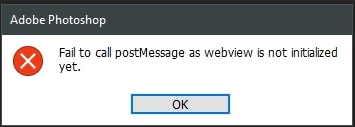
 

I don't know why this happens, but with Photoshop 22 it didn't happen.


Can anyone help me to solve this problem? It's annoying to have to close the three or four popup windows every time they appear.

This topic has been closed for replies.

26 replies

Mohit Goyal
Community Manager
Community Manager
December 14, 2021

Hi all,  


We're happy to announce the release of Photoshop 23.1. This update includes the fix for this issue. To see the list of all fixed issues, click here

To update Photoshop to 23.1, click "Update" in the Creative Cloud desktop app next to Photoshop. More detailed instructions for updating  


Let us know if the update resolves the problem for those affected and share your feedback with us.


Thanks,

Mohit

Participant
November 25, 2021

Thank you Verto,

Iy's a very good solution

Alain

Verto
VertoAuthor
Known Participant
November 8, 2021

Hi @Himanshu Katariya 

First, thank you again for your interest and help.

I have uninstalled Photoshop 23 and deleted the EdgeWebView folder. I also deleted "CommentsPanel 0" in "PSUserConfig.txt".

I then reinstalled Photoshop again, and checked that the EdgeWebView folder was installed correctly.

Finally, I opened Photoshop, but the error message came up again.

I had to recreate the line "CommentsPanel 0" in "PSUserConfig.txt", so that the error disappeared.

Unfortunately your last suggestion did not work. I hope you find this information helpful in resolving the problem.

Best regards.

Verto

Participant
November 8, 2021

Thank you
I did the steps, twice and it worked for me

Adobe Employee
November 8, 2021

Hi @Verto and all,


Please can you try following steps

  1. Uninstall Phototshop 23.0
  2. Delete the folder 'C:\Program Files\Common Files\Adobe\Microsoft\EdgeWebView' if the folder remains
  3. Install Photoshop 23.0 again via Creative Cloud desktop app
  4. Verify folder 'C:\Program Files\Common Files\Adobe\Microsoft\EdgeWebView' gets created

Let us know if this fixes the issue. If this does not help then we would suggest to go with the workaround mentioned earlier i.e. adding text CommentsPanel 0 in PSUserConfig.txt


Thanks,

Himanshu

Verto
VertoAuthor
Known Participant
November 5, 2021

@asanand,  thank you for your help and interest in solving the problem.

Best regards

Community Manager
November 5, 2021

Great news @Verto . Thanks for helping and confirming the behavior. Team is investigating original issue and will share update soon.


Thanks,

Ashish

Verto
VertoAuthor
Known Participant
November 5, 2021

Hi, @asanand 


First, I would like to thank you for your help.


I have been looking for the directory and the file that you indicate, but I could not find it. However, guided a little by your indications, I have accessed the Windows directory:


C:\Users\(my user folder)\AppData\Roaming\Adobe\Adobe Photoshop 2022\Adobe Photoshop 2022 Settings\


In this directory I created a new text file with the name:


PSUserConfig.txt


Inside the file, I have inserted a line with the text:


CommentsPanel 0


Finally, I saved the file, and after closing it I restarted Photoshop. The result was positive. Now the error messages are no longer displayed.

I hope I did it right, and that other users will find this momentary solution useful, while Adobe releases an update to correct the error.


Thank you again for your help and I remain at your disposal, in case you wish to make any comments.


Best regards

Community Manager
November 5, 2021

Hi @The-Togfather  could you please try creating this text .txt file manually? 

Thanks,

Ashish

The-Togfather
Participating Frequently
November 5, 2021

Hello @asanand . As you can see from the attached screenshot, I do ont have PSUserconfig.txt in that folder.


Best wishes


Tog