Inspiring
February 23, 2022

P: Export as 8-bit PNG issue

  • February 23, 2022
  • 65 replies
  • 14927 views

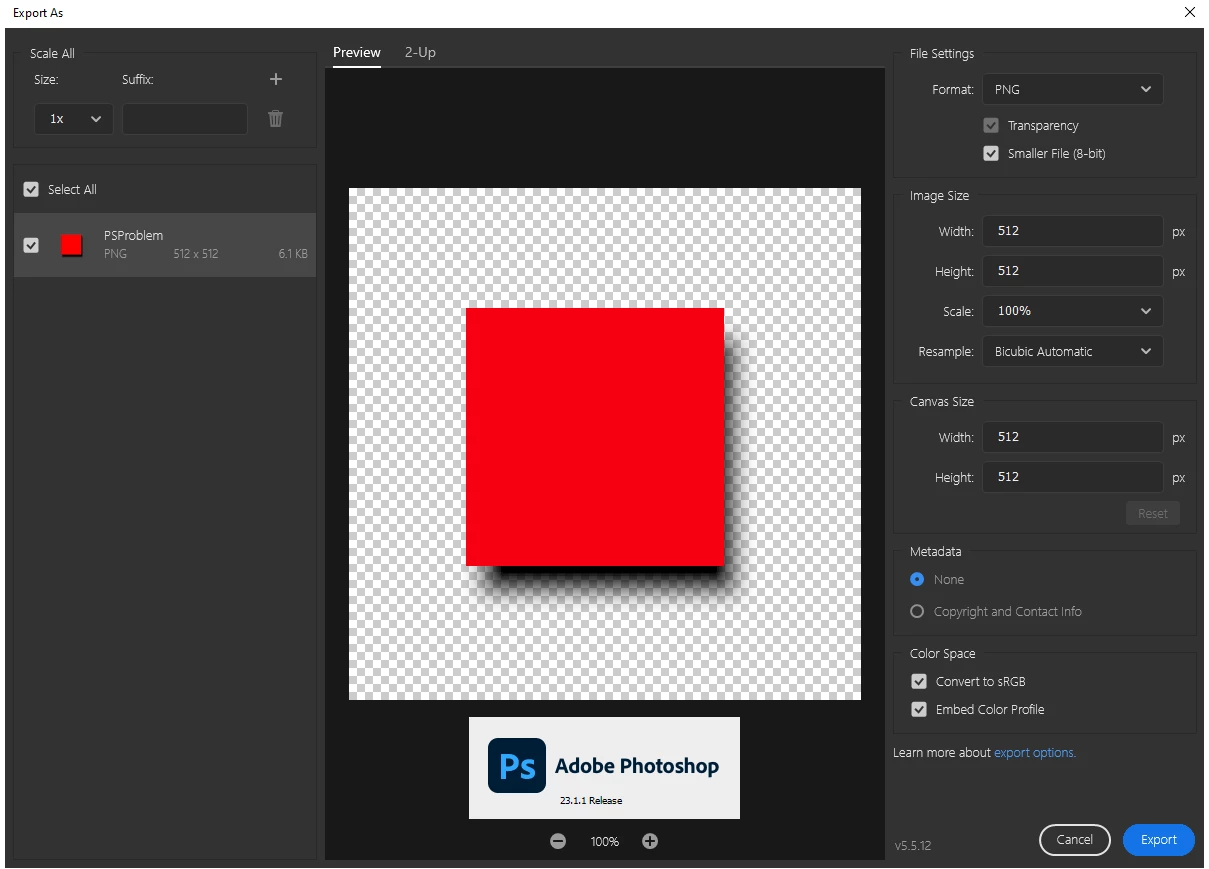
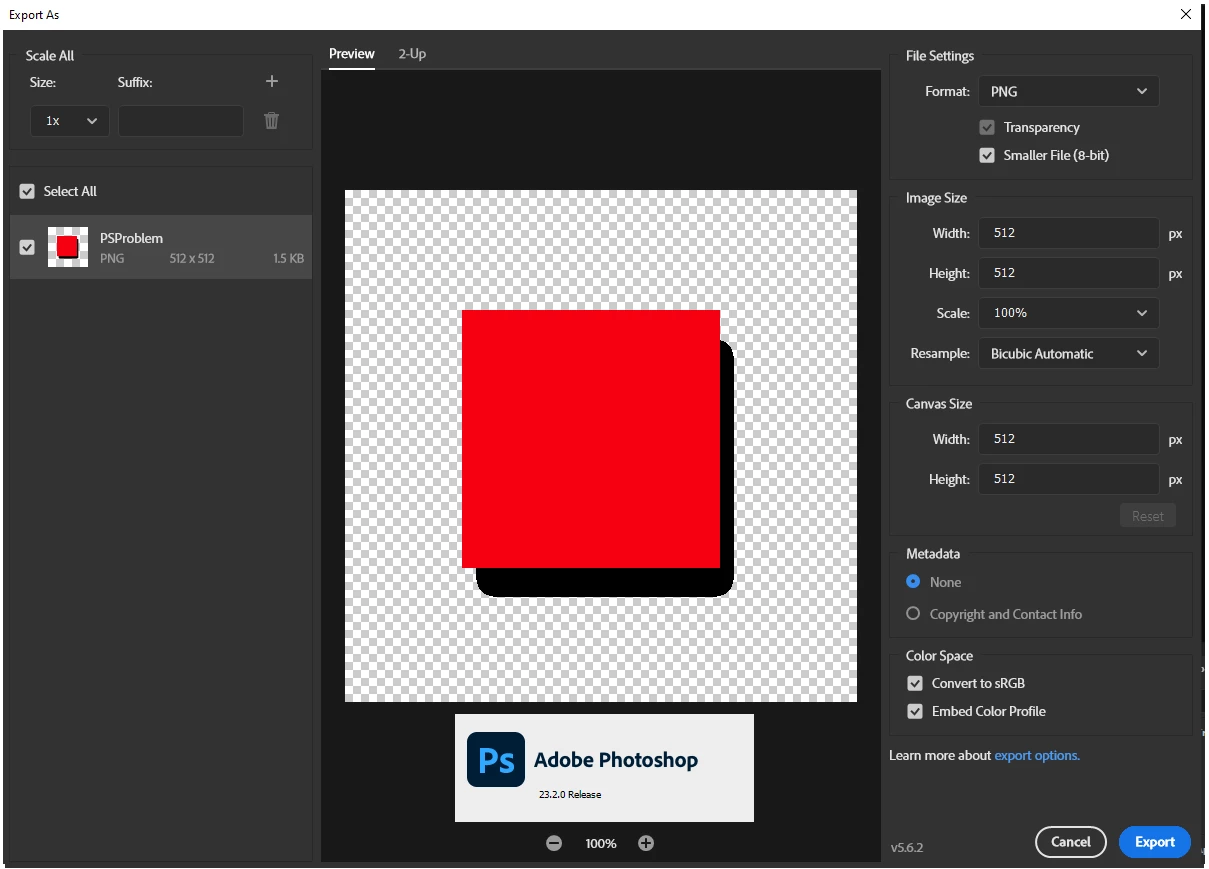
When using the export as dialog the 8-bit (smaller file) is no longer functioning first screen shot is the Export as dialog in PS 23.1.1 Second is same file and same dialog in 23.2.0

65 replies

Jay Riether
Participating Frequently
October 16, 2024

So 2025 version of Photoshop is still not respecting the full specification of PNG with 8-bit tranparency.  WORSE...2025 under Rosetta (on a Mac) doesn't support ANY "Export As.." options.  The feature is broken.  A very unsettling session with customer support that wanted to share computer access lead to a stream of "sudo" permission requests.  DON'T upgrade to 2025 if you need the legacy export options.  Export works in native mode on Macs...but the PNG issue remains.

Participant
September 7, 2023

Hey Adobe - this is still busted. just FYI. Had to export a 24bit png and then get codekit.app (a good app on the mac!) to optimise the png properly to 8 bit png with full transparency.


took me 30 seconds to realise there was a problem in the CURRENT RELEASE OF PHOTOSHOP WHEN WE'RE LIVING IN 2023 (!) to then find this thread and find out Adobe broke it somewhere and don't understand why its broken and how to fix it.

C'mon Adobe. seriously - you need to at least fix this.

ThioJoe
Community Expert
Community Expert
June 22, 2023

@rayek.elfin True, I guess my point was based on the dev saying the feature is now apparently working as intended, and before effectively was doing nothing at all. So I figure if they are going to keep it the way it is, they may as well label it in a less ambiguous way. I agree they should add more options in adding more options for bit depth and transparency.

rayek.elfin
Legend
June 22, 2023

@ThioJoeThe discussion here revolves around the removal of saving an indexed PNG with full 8-bit transparency, rather than the wording used to denote the various PNG export settings.


Renaming it to "256 colours" wouldn't solve the secondary issue here either: the legacy Save for Web function allowed the user to choose to save 1bit (2 colours), 2bit (4 colours), 3bit (8 colours), 4bit (16 colours), 5bit (32 colours), 6bit (64 colours), 7bit (128 colours), and 8bit indexed PNG files. This option is also missing in the new Export dialog.


Therefore, the correct labeling would be "indexed (colours)" instead of "8-bit" or "256 colours" whic would describe the full range of output options rather than merely 256 (8-bit) colours.


In any case, the export options should offer an option to save full 8-bit indexed transparency because it is supported by just about any other image editing app out there and integral in web/game/gui/digital screen oriented pipelines. And it should be possible to select the bit depth as well.


It seems that the only reason why the developers decided to limit Photoshop's PNG Export to 1-bit transparency is because in their rigid-thinking minds Photoshop's index mode only supports 1-bit transparency, and it is "confusing to the user" when indexed PNGs with full transparency open in regular 8-bit per channel image mode in Photoshop. So they decided that an exported PNG from Photoshop should open in Indexed image mode. And therefore removed the full 8-bit transparency "because it is inconsistent".


But completely and miserably missing the point and negating the requirements of current image asset pipelines.


One would expect the devs to consider instead to expand the indexed image mode with an option to support full 8-bit transparency to accommodate current workflows, but that obviously is an outrageously forward-thinking mindset. 😉
Perhaps even (GASP!) layer support in indexed mode! Alternate universe stuff, this.

ThioJoe
Community Expert
Community Expert
June 21, 2023

Perhaps it would make more sense to change the wording in the setting from "Smaller File (8-bit)" to "Smaller File (256 Colors)". It took me quite a bit of reading to understand the different types of PNG color modes, and only then did I realize what the "8-bit" option did.


I bet I am not the only person who assumed the Export menu's mention of "8-Bit" meant 8 bits per channel, not an 8 bit index of a pallete of colors, aka 256 total colors. To me, saying "smaller file" kind of implies a type of compression. And I am sure a lot of people assume the 8-bit wording in the Export menu means the same thing as the "8 bits/channel" I would see in the Image > Mode menu. 


Labelling it would remove all ambiguity in what exactly the setting does, and also make it way easier to deduce why semi-transparent pixels turn full opaque when the feature is enabled.


I made another post to propose this idea, feel free to vote on it: https://community.adobe.com/t5/photoshop-ecosystem-ideas/idea-change-png-quot-smaller-file-quot-option-from-saying-8-bit-to-256-colors/idi-p/13883339

Participant
May 4, 2023

15 MONTHS, 15 MONTHS WAITING AND NO SOLUTION! I HAVE NEVER BEEN SO DISAPPOINTED WITH A WORK TOOL, WHICH ALSO WE NEED TO BE ABLE TO DO OUR JOB WELL.
THIS IS SO DISGUSTING

Participating Frequently
January 31, 2023

Well, instead of dealing with Pantone colors they're going to cut out the needed functions XD

Nobody owes us anything. It is our problem that we pay them though. Wake up it's 21st century

Dan Rodney
Community Expert
Community Expert
January 6, 2023

When Export As introduced a semi-transparent PNG-8 (like Fireworks was able to export), I was extermely happy! Finally Photoshop had caught up. It pains me to see Export As going backwards in features (removing transparent PNG-8 export, dumbing down JPEG export to only a few quality settings so we have less control over file size) and it still doesn't support animated GIF after all these years!


Removing partial transparency from the PNG 8 is a huge step back in features I need, and it seems other people here agree. I was shocked to read that transparent PNG-8 was considerd a bug and "fixed" when I have zero need for non-partial transparent PNG-8. If others need that, it's OK to include it too, but not at the expense of removing the other extremely useful one that I and others rely on. PNG-8 with partial transparency produces considerably smaller files than PNG-24. I don't care what you call it, but please bring back partial transparency PNG-8 that some of us use and need.

— Adobe Certified Expert & Instructor at Noble Desktop | Web Developer, Designer, InDesign Scriptor
Participating Frequently
September 5, 2022

It's just more proof, if any more was needed, to how out of touch Adobe is with the needs and concerns of its customers. Placing internal developer desires over the productivity of their users. The extra work added to our daily workflow due to this incomphrensible and stubborn change is incredible. Every time I face it, I come back to this thread to see if @BrettN  or anyone else from Adobe has addressed it again.


Adobe have become the outdated behemoth; slow and out of touch, just like Quark before them. ("Who?" Adobe killed Quark by creating better software for professional customers.)

Participating Frequently
August 16, 2022

I am so sick and tired of this adobe I cannot even describe (profanity removed by moderator).


I updated creative cloud and other apps (Indesign stopper working properly) and the settings in the creative cloud were changed to update everything automatically.


Then I see that photoshop was updated again to the latest version with cut function for export (discussed in this thread).


What happens when you update the creative cloud - it automatically updates the settings you turned off after the last and it then updates photoshop to the verion you are not ok with and then you cannot go back to the last version that just worked for you?


I tell you. They have absolutely no intention of fixing it for you, they will let you steam off in this dumpster of a forum and nothing will be back to when it worked. More so the version that was ok for you will no longer be there.


This makes me question whether I need to update anything from Adobe at all. The reality is that I will stay away from the update for as long as possible and when I cannot do it anymore I will cancel the contract and switch to afinity.


I am so unbelievably mad, I cannot describe. adobe does things which I explicitly TURN OFF in the previous version.