


Participating Frequently
April 20, 2016

P: Export via PDF Presentation, it reverses the order of pages from what's displayed in the dialog

  • April 20, 2016
  • 27 replies
  • 4723 views


When I
drag & drop a PDF file into Photoshop , the page order will be like 5,4,3,2,1 so you have to put them in order ONE-by-One  ... that's a problem when you have like 500
pages  ...
it's in the PDF presentation menu
When you'd like to create a Multi-page PDF... it should be an option to put the imported PDF pages in the right order. The right order would be like 1,2,3,4,5.....etc.
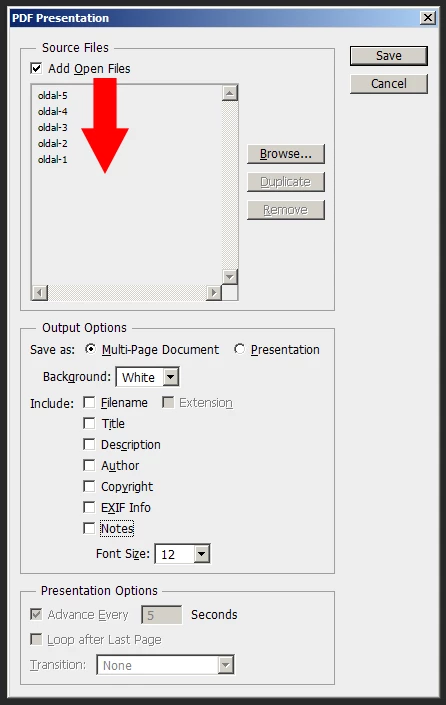


Somebody has the same problem in 2014 on your forum. Even R_Kelly couldn't aswer it :D:D Check it:

https://forums.adobe.com/thread/1526111?start=0&tstart=0

"in Photoshop cs6, I am working on a multipage pdf catalog. When I import or open the pdf in Photoshop, it reverses the order of page. for example: Page 4, Page 3, Page 2, Page1. And when i batch>automate pdf presentation, it save the pages in the wrong order. How do i get it to open and batch pdf presentation in the right order?"

This topic has been closed for replies.

27 replies

Inspiring
May 13, 2021

@Nikunj_Muglani This did not fix the issue for PSE 19.  I uninstalled and reinstalled the program and the pages still open in the exact same reversed manner, as well as save in reverse when I choose "print to PDF."

Here is a screenshot of what the problem looks like:

https://www.madisonasg.com/brokenpdf.html

Inspiring
May 13, 2021

@Nikunj_Muglani  Great stuff!  Looking forward to working on the new version

nikunj.m
Legend
May 13, 2021

Hi,


We're happy to announce the release of Photoshop 22.4 which should include the fix for this issue. To update Photoshop to the latest version, you can check: https://helpx.adobe.com/creative-cloud/help/creative-cloud-updates.html


For information on other issues fixed with this update, please check: https://helpx.adobe.com/photoshop/kb/fixed-issues.html


Regards,

Nikunj

Inspiring
April 26, 2021

@Lance023 *natef After getting nowhere for a while with Photoshop, I realized why this isn't really an issue they care to address -- I purchased a subscription to Adobe Acrobat. Now my pdfs compile in order but there are visual issues with the compression of the images even if I unclick "optimize" options in Acrobat. However, if you do not have any significant visual elements (namely overlapping text of the same color will create a "negative space" white area where the letters overlap) I recommend switching to Acrobat as at least you won't have to manually reorder your 50-100 page documents like I do.

Lance021
Participating Frequently
April 24, 2021

I tried but That doesn't work.

Inspiring
April 24, 2021

This doesn't fix it. 

Inspiring
April 24, 2021

That doesn't work either. 

Inspiring
April 24, 2021

This is still happening in Adobe Photoshop Version: 22.3.1 20210406.r.122.

I sort by name and it's correct there but when you hit save it saves them all in reverse order. I have also tried the suggestion of saving it as a presentation. Same issue.

Hard to believe this issue has been around so long without an actual fix. 😞 

Inspiring
December 5, 2020

Just save as Presentation (with "advance every X seconds" unchecked) instead of a multi-pagered document! 😄

Inspiring
December 5, 2020

Just save as Presentation (with "advance every X seconds" unchecked) instead of a multi-pagered document! 😄