


Participating Frequently
April 20, 2016

P: Export via PDF Presentation, it reverses the order of pages from what's displayed in the dialog

  • April 20, 2016
  • 27 replies
  • 4723 views


When I
drag & drop a PDF file into Photoshop , the page order will be like 5,4,3,2,1 so you have to put them in order ONE-by-One  ... that's a problem when you have like 500
pages  ...
it's in the PDF presentation menu
When you'd like to create a Multi-page PDF... it should be an option to put the imported PDF pages in the right order. The right order would be like 1,2,3,4,5.....etc.
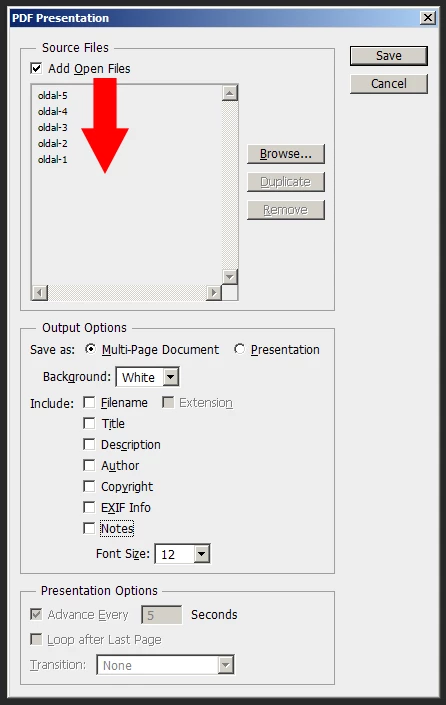


Somebody has the same problem in 2014 on your forum. Even R_Kelly couldn't aswer it :D:D Check it:

https://forums.adobe.com/thread/1526111?start=0&tstart=0

"in Photoshop cs6, I am working on a multipage pdf catalog. When I import or open the pdf in Photoshop, it reverses the order of page. for example: Page 4, Page 3, Page 2, Page1. And when i batch>automate pdf presentation, it save the pages in the wrong order. How do i get it to open and batch pdf presentation in the right order?"

This topic has been closed for replies.

27 replies

Inspiring
December 5, 2020

Just save as Presentation (with "advance every X seconds" unchecked) instead of a multi-pagered document! 😄

Inspiring
December 5, 2020

Just save as Presentation (with "advance every X seconds" unchecked) instead of a multi-pagered document! 😄

Inspiring
December 5, 2020

Just save as Presentation (with "advance every X seconds" unchecked) instead of a multi-pagered document! 😄

Inspiring
December 5, 2020

I've found a way! In automate PDF > output options > instead of multi page document, select PDF presentation and then in Presentation Options, uncheck "advance at X seconds". It created a PDF in the correct order. I don't know the exact names because my PS is in BR Portuguese, but I guess this is accurate. Hope I helped anyone. 🙂

Legend
November 19, 2020

Changing the title of this topic. The issue now is Export is opposite of order displayed in the dialog. 

Inspiring
November 19, 2020

@JeffreyTranberry why not type your message in reverse and then give the reader a button to press to put it in the right order?

Inspiring
May 23, 2020
I've made a test PDF with the first seven pages in PDF form, in order to show you the issue is easily replicated when using PDFs instead of jpgs.

As you can see, 1.PDF has become page 7 of 7.

Inspiring
May 23, 2020
I'm having the same issue, it will load them in the right order if they are in jpg format but if I use pdfs it collates them backwards even after using Sort By Name or even sorting them manually. They appear in the correct order in the browse window but automate backwards.

I could use jpgs or reorder the pages backwards to fix it, but with the first option I lose the capacity to have selectable text and links in my pdf, and the latter is clearly no solution for the long term, as I put together a magazine every month and having to reorder my print ready PDFs so I can make a digital copy is really time consuming (not to mention explaining to my boss that Adobe Photoshop is the reason I need to take longer to give them a digital file when the magazine is already post proofs makes me look... Well. Like a liar.)
Inspiring
May 18, 2020
Doesn't work with Sort by Name either
Legend
January 15, 2020
Why not just click the Sort By Name button?