


Inspiring
October 26, 2018

P: Free Transform/Distort tool inconsistency

  • October 26, 2018
  • 128 replies
  • 3520 views

Hello,

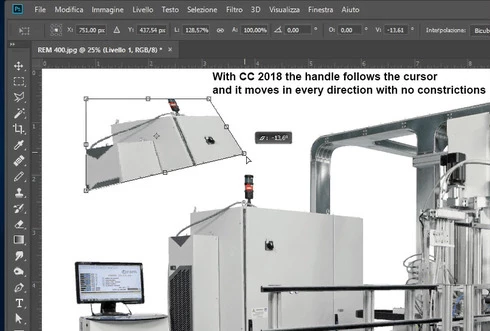
using the tool Free Transform (Ctrl+T) in the new version of Photoshop CC 2019 (release 20.0.0) on a Windows 10 64 bit PC, I'm not able anymore to move the handle of a selected area (using the Ctrl button) in a free mode, now I can move it along the vertical or horizontal ax only.
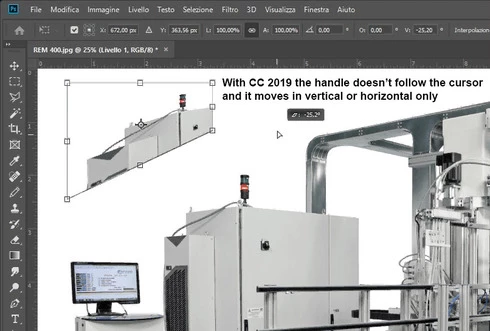


Which setting I have to change in order to have the same behavior of the tool as in Photoshop CC 2018 (release 19)?


Many thanks!!!

Luciano

This topic has been closed for replies.

128 replies

Participant
October 26, 2019
I got so sick of things being so different, such as free transform, I have been using 2018 
Inspiring
October 25, 2019
it doesn't works
Inspiring
July 30, 2019
Hi
how do I change the little guide boxes on the skew setting from solid white to just an outline so i can see inside where the exact placement should be.

Thank you
Michael
Inspiring
July 21, 2019
We don't need tick boxes to bring back the usability of the apps. It not just the transform tool. Same goes with the undo shortcut, the '' new'' windows that have legacy tick boxes too... Just restore the original staff you now call 'legacy'and leave them at defaults. .. Tell your programmers to not fix what's not broken, every user is telling you this..
RosaPerry
Inspiring
July 21, 2019
With the 20.0.5 update, there is now a user facing preference under Preferences > General... and check "Use Legacy Free Transform"


Rosa
Inspiring
July 21, 2019
Adobe bring back all the shortcuts asap. No one asked for this. Find different ways to justify the subscriptions. You are loosing your professional customer base and if you keep making unnecessary "updates" like these, you will end up loosing millions of dollars. Period.
Warren Heaton
Community Expert
Community Expert
June 27, 2019
For what it's worth, the most recent update to Photoshop includes a preference for "Use Legacy Free Transform".

Participant
June 19, 2019
Maybe now I will reinstall Photoshop CC 2019.  The free transform was my reason for going back to 2018 
Known Participant
June 19, 2019
Thank you Jeffrey... just when I thought Adobe didn't care about us, you came through with a fix that we can live with!  I appreciate your efforts and would appreciate it with "future major tool updates" like this one, if you would provide us with a "legacy button" in the preferences as you have here.  The natives would not grow restless nearly as much!
Participating Frequently
June 19, 2019

Many thanks for that addition to preferences and listening to your old users, who have been used to legacy shortcuts and functions for decades.