


Inspiring
October 26, 2018

P: Free Transform/Distort tool inconsistency

  • October 26, 2018
  • 128 replies
  • 3485 views

Hello,

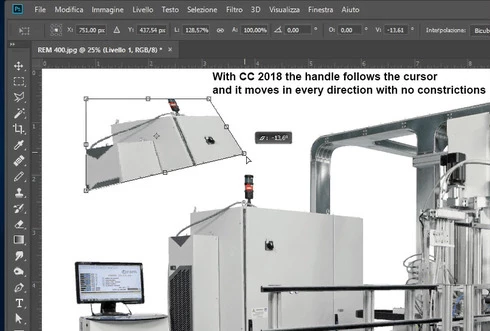
using the tool Free Transform (Ctrl+T) in the new version of Photoshop CC 2019 (release 20.0.0) on a Windows 10 64 bit PC, I'm not able anymore to move the handle of a selected area (using the Ctrl button) in a free mode, now I can move it along the vertical or horizontal ax only.
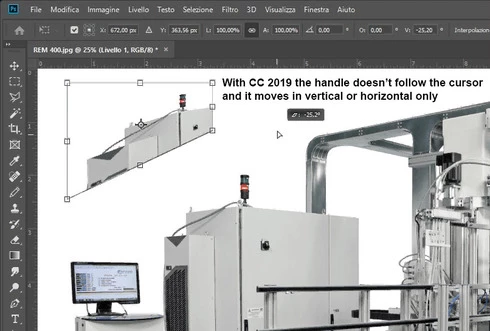


Which setting I have to change in order to have the same behavior of the tool as in Photoshop CC 2018 (release 19)?


Many thanks!!!

Luciano

This topic has been closed for replies.

128 replies

Legend
June 19, 2019
Known Participant
June 18, 2019
I just did that also.

Adobe, you are untrustworthy and your business model is awful.  Your business model is irritate the customer until they leave.  Well, I just left PS 2019 after the last update that NEGATED the fix for the transform tool screw-up .  WHY FIX SOMETHING JUST TO UNFIX IT IN THE NEXT UPDATE!!!  Nothing personal... but I'm sick of this and you, Adobe, are driving me to explore alternate solutions.

Regretfully, Nolan Conley
Participant
June 11, 2019
I uninstalled 2019 and have been using 2018 since.  
Participating Frequently
June 11, 2019
Please Adobe: Add this option somewhere to Menu/Edit/Preferences in the next update. It's really annoying to make this text file and find the correct place after each installation of PS on another machine.
Known Participant
June 11, 2019
Update... I have fixed the problem with an Adobe Chat tech.  Here is the conversation and the fix.  Do this exactly and PS2019 will transform like PS2018 did.  I know it's a pain but it gets the job done.

Shall I guide you with the steps so that you can perform them on your computer?
ok
Anusha
Please close the Photoshop application.
done

To revert to the legacy transform behavior, do the following:


1.       Use Notepad (Windows) to create a plain text file (.txt).
2.       Type the text below in the text file:
TransformProportionalScale 0
3.       Save the file as "PSUserConfig.txt" to your Photoshop settings folder:
 Windows: [Installation Drive]:\Users\[User Name]\AppData\Roaming\Adobe\Adobe Photoshop CC 2019\Adobe Photoshop CC 2019 Settings\
Please open the Photoshop application and check.
inprocess

Okay, please let me know if you face any issue.
opening photoshop now

Okay, please check the application now.
That worked.

That is great. The features are still the same in Photoshop 2019 version. just requires some steps to be performed.
I really hate it when some engineer has a spasm and screws up the software we make our living on.  There was nothing wrong with the Transform tool as it was.  Please tell the higher ups at Adobe to quit trying to fix what isn't broken.  Thank you for your help!  Have a good evening.

Participating Frequently
June 11, 2019
Thank you!!!!!!!
Known Participant
April 16, 2019
I'm like you... have been using PS since V3.  I've uninstalled PS2019 and just keep using PS2018 until someone at Adobe grows some common sense and this nightmare is fixed.
Inspiring
April 16, 2019
Been using PS since 1998. Generally most updates are improvements and nice to have's. This messing with the transform tool makes me not open photoshop 2019. Going to uninstall and use 2018 till they get it right. 
Inspiring
March 14, 2019
I have now reverted to using my DVD version of CS6. Even when I rolled back to v.19.1, the transform feature is still awful and bounces all over the place...plus I still have to hold down ctrl to add a guide.

Hopeless Adobe. Please listen to your customers!!
Inspiring
March 12, 2019
And another thing with 'Transform' in CC 2019...If you try and add a guide, it automatically ends the transform. You now have to hold down Command or Control when getting a new guide. Why?