


Inspiring
October 26, 2018

P: Free Transform/Distort tool inconsistency

  • October 26, 2018
  • 128 replies
  • 3520 views

Hello,

using the tool Free Transform (Ctrl+T) in the new version of Photoshop CC 2019 (release 20.0.0) on a Windows 10 64 bit PC, I'm not able anymore to move the handle of a selected area (using the Ctrl button) in a free mode, now I can move it along the vertical or horizontal ax only.
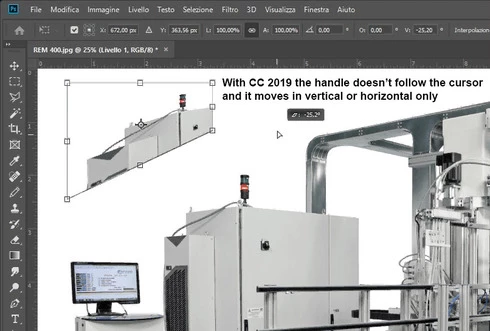


Which setting I have to change in order to have the same behavior of the tool as in Photoshop CC 2018 (release 19)?
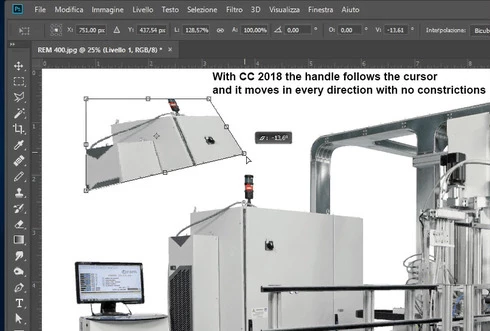


Many thanks!!!

Luciano

This topic has been closed for replies.

128 replies

Inspiring
March 12, 2019
I've rolled back to version 19.1.
Hard to believe they make you pay for this.
My original dvd version CS6 was working fine. I opt for the new 2019 CC and it doesn't work!
Transform jumps all over the place when I try and use it. Shockingly bad.
Inspiring
February 26, 2019
15 years of muscle memory gone... Ive just started using 2019 and it seems a lot of things have been switched and swapped by default. I couldn't find the pivot in the free transform (its turned off by default...) Constraints on free transform now work in reverse. not sure i dig it.
Inspiring
February 7, 2019
this makes the transform work differently to illustrator and indesign.  So see that muscle memory?  GO F yourselves
Participating Frequently
January 9, 2019
I've used the .txt file fix and all is right again.  Now I don't have to guess what it's going to do every time I try to transform something.  It was slowing me down, had to revert back to the old, non-buggy way.  Thanks for the tip, Erik.
Known Participant
January 9, 2019
That makes two of us! You're not alone Erik!
Inspiring
January 8, 2019
https://helpx.adobe.com/photoshop/using/transforming-objects.html#transform-scale-proportionally

First entry gives you back the old behaviour.

I have the feeling Adobe isn't aware of their core user base anymore. They just change what they think "feels" right not recognizing real professional people use this software for over a decade now. I honestly ask Adobe, who in the world requested this nonesense? Because I, as a semi-active community member, never saw any heated conversation about this?!... Until now.


Participant
January 1, 2019
Why make it worse.  I would like to go back to PScc2018 
Kukurykus
Legend
November 16, 2018
They do application for themselves we can kindly pay for with no objection since that was not meant for 'some' users that constantly complain for the perfect vision of their buggy product 😉
anooska
Participant
November 16, 2018
Downgrading is more of a protest than a solution. I'm sure I could have found a fix for the issues within minutes and adjusted w/e shortcuts they changed, but I was just so annoyed with the change that I simply don't want to use their new update. Hopefully when they see that the new software isn't being used, they'll revert the changes or at least have them ON by default.

Generally when you roll out a massive update like this that messes with people's brains, you need to include a pop-up or a notice telling you how you can turn it on/off. Extremely unprofessional!
Participating Frequently
November 16, 2018

OK. It works. But it took me much time to find in the forum where to create this file as I haven’t used it before. And I will have to remember now to take this file with me to all computers I happen to work on and remember where to place it.

So my suggestion and great plea to Adobe is just to add the change of this option to Edit/Preferences menu.

I can understand the intention of Adobe to simplify operations that are probably used more often and will be easier for beginners. But this change is really horrible for old users (I am 70) who were used to certain keyboard shortcut combinations for decades not even thinking which key modifier controls which aspect of the operation, like e.g. Ctrl+Alt+Shift for perspective correction in Free Transform.