


Inspiring
October 26, 2018

P: Free Transform/Distort tool inconsistency

  • October 26, 2018
  • 128 replies
  • 3520 views

Hello,

using the tool Free Transform (Ctrl+T) in the new version of Photoshop CC 2019 (release 20.0.0) on a Windows 10 64 bit PC, I'm not able anymore to move the handle of a selected area (using the Ctrl button) in a free mode, now I can move it along the vertical or horizontal ax only.
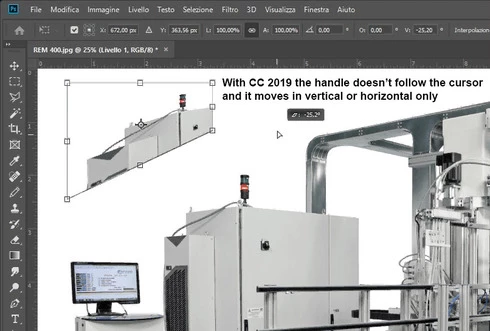


Which setting I have to change in order to have the same behavior of the tool as in Photoshop CC 2018 (release 19)?
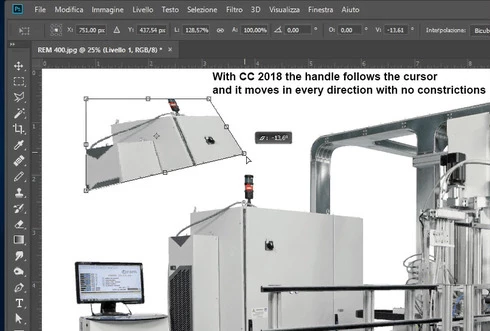


Many thanks!!!

Luciano

This topic has been closed for replies.

128 replies

45634563545
Inspiring
November 16, 2018
I agree, of course.
But my question is 'why downgrade when one line of text solves the problem?' - not whether or not this new transform behavior change is good. I'm NOT advocating for Adobe here, at all. This change horrified me as well.
Yet . . . as long as PS keeps honoring my PSUserConfig.txt, it's a non-issue and I can forget about it.
Is it ideal? No.
Does it work (for now)? Yes.

(many of us are already in the habit of adding switches to PSUserConfig.txt in order to get our wacoms to work correctly with photoshop)

Inspiring
November 16, 2018
Because I shouldn't have to make a kludge solution like this to use software that I use professionally and pay handsomely for. Your letting them off the hook for not thinking something through properly (add a radio button to use legacy keyboard commands for example).
45634563545
Inspiring
November 16, 2018
ALSO, why is anyone downgrading just because of this???
You simply add:
TransformProportionalScale 0
to your PSUserConfig.txt file.
This recommendation comes straight from Adobe themselves. (source: the link above)


45634563545
Inspiring
November 14, 2018
Incorrect; new transform behavior is listed here: https://helpx.adobe.com/photoshop/using/whats-new.html#user-experience-improvements    under the "Transform proportionally by default" heading.
Participating Frequently
November 14, 2018


In
the newest PS version (20.0), all shortcuts in Free Transform Tool doesn’t work
as they should and always worked. No mention about any changes here in New
Features, so it is an evident bug. I had to downgrade to a previous version to
be able to work at all.
Kukurykus
Legend
November 9, 2018
They read just for relax after hard day of work. Thinking of that what's unthinkable must be tough!
Inspiring
November 9, 2018
Exactly! If Adobe is going to change basic UI and UX that has been in place for years, then they should provide preferences that allow long time professional users (or anyone) to configure the app they way they want, or at least provide a "legacy" option like they do for their New Document window. 

Does anyone from Adobe actually read these posts before or after updating their apps?
Kukurykus
Legend
November 9, 2018
The stupiest thing is they force us which shortcuts we have to use while leaving many of other ones still configurable. Why not all? The real step forward would be to let use any combinations of keys the way we want. Now they are too limited! Why Adobe doesn't focus on improvements and bug fixing only, but divide us into 2 groups of users where one must prove their preferences. It's like saying to Windows users to purchase Apple or vice versa. They play cruelly on our emotions 😞
Kukurykus
Legend
November 9, 2018
They had no idea for new features so to explain a need of another release they changed that is fundamentaly unchengebale, while that was so huge change that new Photoshop became really like other program to learn that many of us gave up to downgrade to previous trusted version 😕😕
Known Participant
November 9, 2018
Next thing you know, they will make you hold shift to paint freeform. The default behavior will be to paint in straight lines only.

This is by far the most ridiculous change on software history.