


Inspiring
October 26, 2018

P: Free Transform/Distort tool inconsistency

  • October 26, 2018
  • 128 replies
  • 3522 views

Hello,

using the tool Free Transform (Ctrl+T) in the new version of Photoshop CC 2019 (release 20.0.0) on a Windows 10 64 bit PC, I'm not able anymore to move the handle of a selected area (using the Ctrl button) in a free mode, now I can move it along the vertical or horizontal ax only.
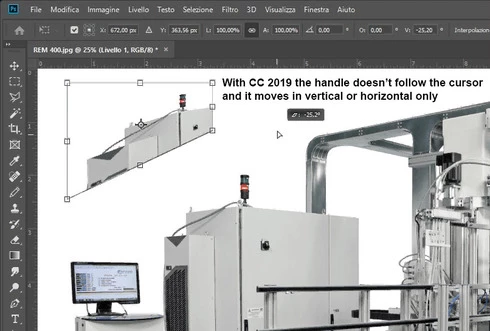


Which setting I have to change in order to have the same behavior of the tool as in Photoshop CC 2018 (release 19)?
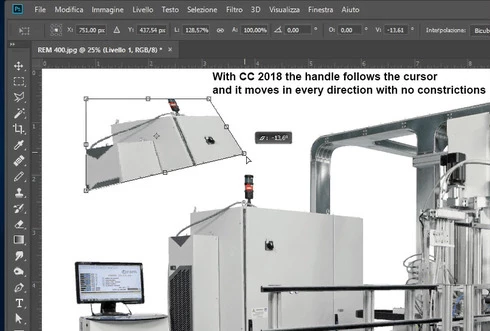


Many thanks!!!

Luciano

This topic has been closed for replies.

128 replies

45634563545
Inspiring
October 30, 2018
"addicted users" 

oh boi . . .


Speaking of the "Maintain aspect ratio" button, it would help alleviate this issue if it didn't LIE to us now.

Whether or not I've toggled it, and I'm dragging any of the 8 transform control points, PS just does whatever the $&$^%$ it wants.
It no longer honors that button for mouse input.
It DOES honor the "Maintain aspect ratio" button if entering values in the textboxes, however.

Considering this, it starts to feel more like a bug.


There IS a global toggle for making the transform reference point visible, during transform, in the toolbar (linked to the one in preferences), so sure - Why not one more for this?
Kukurykus
Legend
October 30, 2018
Command f? Where exaclty to use it?
Kukurykus
Legend
October 30, 2018
Command f? Where exaclty to use it?
45634563545
Inspiring
October 30, 2018
Oh, hold the phone!

There's a transform reference point toggle button in the top toolbar, available while transforming:


I tested it. It is in fact linked to the toggle in prefs:

Participant
October 30, 2018
They will wait until we all get use to the change and then change it again. I know it can be changed but does changing command f to repeat a filter to a search window bug anyone else? Why do you need another search choice there.
Kukurykus
Legend
October 30, 2018
It should be done this way while releasing last Photoshop. I would accept it, but old behaviour with option for new would be even better to respect those who used Ps longer than new ones.
Kukurykus
Legend
October 30, 2018
That's right, but that was irony. By reading I meant hearing us. I used read as it's dear palindrome.
Inspiring
October 30, 2018
My suggested behavior is the same as before.
1) Keep proportions would be on by default
2) Click on chain icon in the toolbar will change it and it will turn it on/off and this will be used as a default for all other transformations.
3) It shouldn't affect free transform

So new users will have user-friendly behavior and the addicted users could this turn off in 5 seconds and keep it that way forever.
Inspiring
October 30, 2018
They do. Because some similar topics were merged into this one. Only Adobe can do that.
Kukurykus
Legend
October 30, 2018
DEAR Adobe, please READ our comments!