


Inspiring
October 26, 2018

P: Free Transform/Distort tool inconsistency

  • October 26, 2018
  • 128 replies
  • 3522 views

Hello,

using the tool Free Transform (Ctrl+T) in the new version of Photoshop CC 2019 (release 20.0.0) on a Windows 10 64 bit PC, I'm not able anymore to move the handle of a selected area (using the Ctrl button) in a free mode, now I can move it along the vertical or horizontal ax only.
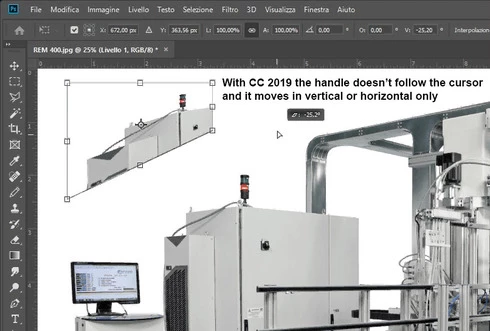


Which setting I have to change in order to have the same behavior of the tool as in Photoshop CC 2018 (release 19)?
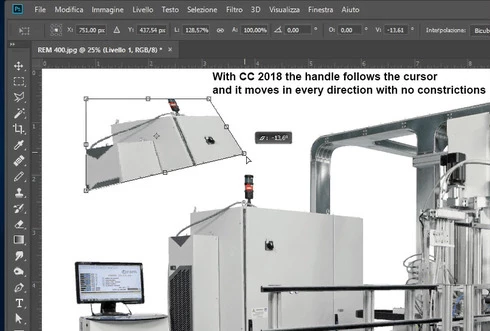


Many thanks!!!

Luciano

This topic has been closed for replies.

128 replies

45634563545
Inspiring
October 30, 2018
Reversing what holding SHIFT does while transforming is a laughably terrible idea, but nobody is surprised that the Photoshop team green-lighted this change if they're aware of Photoshop's changelog over the past decade.

in addition:
The "reference point" is also hidden by default now. Even if you alt click, while transforming, to set a different point of rotation, you CANNOT see it even though you've moved it LOL. You don't know for sure if you've moved it or not until you continue to scale/rotate.
You have to click a new checkbox in prefs in order to make it visible again.

Laughing and crying in tandem.
Kukurykus
Legend
October 30, 2018
That's true! Changes made to new Photoshop are not meant for experienced users, but for fun use!
lonnyc85144968
Participating Frequently
October 30, 2018
That was my solution as well!
Kukurykus
Legend
October 30, 2018
Basically there's nothing so fantastic about CC 2019 that wasn't part of CC 2018 you had to miss it. So be happy - there is over a year till next release 😉 Maybe then they'll workout something better 😉
Known Participant
October 30, 2018
Hi Mark... thanks for your suggestion.  It's just that I pay over $50 per month and really shouldn't have to fix the the new releases.  It's like these "improvements" are made by kids who don't sit at a desk 5 days a week having to use the program to get work out.  Anyway, thanks again!
Known Participant
October 30, 2018
You may have to go back a few pages... there is an easy fix for this, and it works fine after that.
Known Participant
October 30, 2018
Dear Adobe... I figured out how to fix your transform tool problem... I UNINSTALLED Photoshop CC 2019!  I'm now using PS 2018 and all works fine!  Please pass this on to the idiots who made this change.
Inspiring
October 30, 2018
If you have the Creative Cloud you can install previous releases of Photoshop:

-select the program, "Manage", "Others versions" then choose the version you like


Participant
October 30, 2018
I wish when installing a new release they would leave the last release in the programs folder so you have the option to go back to the version that worked properly. Another issue I found is when I did a resize and canvas extend it moved  elements out of place. I lost hours of work and had to make apologies to clients on tight deadlines. Not cool.
Inspiring
October 30, 2018
As Jaroslav Bereza and John Eudicone suggested to me, now you have to press crtl+shift buttons (on windows) in order to transform a selection freely.