


Inspiring
October 26, 2018

P: Free Transform/Distort tool inconsistency

  • October 26, 2018
  • 128 replies
  • 3522 views

Hello,

using the tool Free Transform (Ctrl+T) in the new version of Photoshop CC 2019 (release 20.0.0) on a Windows 10 64 bit PC, I'm not able anymore to move the handle of a selected area (using the Ctrl button) in a free mode, now I can move it along the vertical or horizontal ax only.
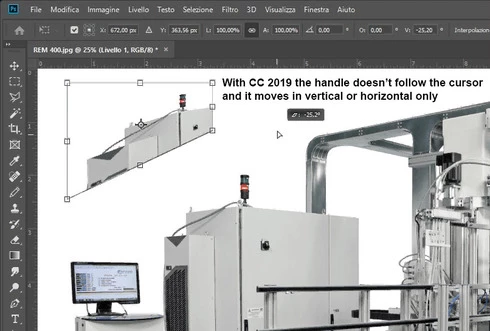


Which setting I have to change in order to have the same behavior of the tool as in Photoshop CC 2018 (release 19)?
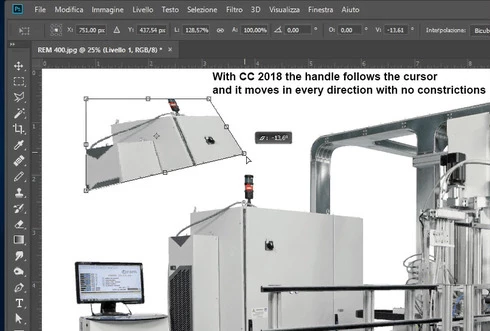


Many thanks!!!

Luciano

This topic has been closed for replies.

128 replies

Inspiring
October 30, 2018
As Jaroslav Bereza and John Eudicone suggested to me, now you have to press crtl+shift buttons (on windows) in order to transform a selection freely.
Inspiring
October 29, 2018


There is something seriously wrong with Distort in the latest version and I do not have the time to find a workaround. What a shame and it was working so well!
Looking at all the reported problems, makes you wonder if Adobe bothered to check anything on this latest update.
Inspiring
October 29, 2018


Since the new 2019 upgrade "distort" in the transform doesn't work well. I cannot anymore pull the sides out with the middle square of each line. I mean I used to be able to pull the image into a different aspect ratio with the square buttons in the middle of each side. now that doesn't work anymore and I can't seem to find a useful alternative..
Inspiring
October 26, 2018
Many thanks for your help John!!!
Inspiring
October 26, 2018
Many thanks for your help Jaroslav!!!
Inspiring
October 26, 2018
the free transform tool no longer allows you to transform freely! it constrains proportions by default, forcing you to depress the shift key. Adobe has once again made their product more cumbersome to use!

Inspiring
October 26, 2018
This is the side effect of "shift" key behavior change. Now you have to hold "shift" key. I consider this as undesired side effect or was it intended behavior?