


Inspiring
October 26, 2018

P: Free Transform/Distort tool inconsistency

  • October 26, 2018
  • 128 replies
  • 3520 views

Hello,

using the tool Free Transform (Ctrl+T) in the new version of Photoshop CC 2019 (release 20.0.0) on a Windows 10 64 bit PC, I'm not able anymore to move the handle of a selected area (using the Ctrl button) in a free mode, now I can move it along the vertical or horizontal ax only.
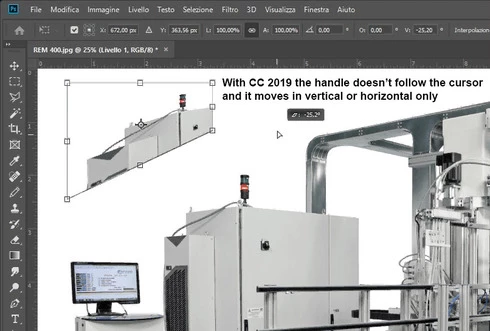


Which setting I have to change in order to have the same behavior of the tool as in Photoshop CC 2018 (release 19)?
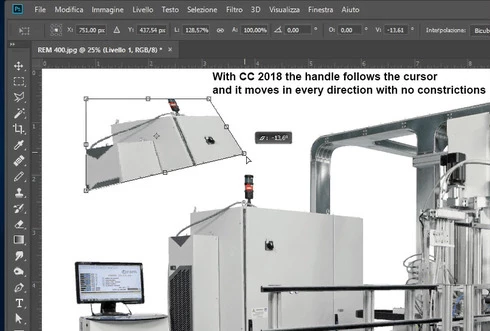


Many thanks!!!

Luciano

This topic has been closed for replies.

128 replies

Kukurykus
Legend
November 6, 2018
I'm not sure this problem is related to that original poster stated...
Participant
November 6, 2018


In the new version of photoshop you hold shift to not constrain the proportions however the feature doesn't always work. Sometimes transform works like it use to and other times it works the new way. Needs to be fixed to be one way or the other, not both and having to guess if I need to hold shift or not this time.
Inspiring
November 6, 2018


I place a vector logo onto my document. When I click one of the transform controls (top right corner in this case) the logo instantly is stretched when it goes into "transform mode." VERY frustrating.
Kukurykus
Legend
November 5, 2018
You are lucky Windows 7 is still supported for 32 bits Ps, but as you may read many others not:

https://feedback.photoshop.com/photoshop_family/topics/upcoming-changes-to-digital-imaging-os-suppor...
Known Participant
November 5, 2018
Can you imagine the amount of changes to the software if they actively try to force iPad user workflow into a desktop app?

What's next, we need to use 2 mouses or pens to replicate 2 finger gestures?

Also - it's not happening anytime soon. Large companies are not overhauling their investment in desktop PCs/Macs retraining entire employee base, restructuring IT depts, changing email systems, networks, etc. At my work, we are still on Win 7 for a reason. It's too much of an overhaul for too many complex systems, and not worth the cost.

This would not be the time to meld iPad features and workflow into desktop Photoshop. It would be way better for them to develop them seperately and refine each program specifically for it's user base.
Kukurykus
Legend
November 5, 2018
Yes - they still would earn money keeping distinct versions (just other way configured user settings that costs nothing) but when we see there's no any logic in their doings there's most possibly some uprising theory comes true. What could made them to follow this way? When you read what people say we all can agree that's nonsense. Woud so huge company be so unresonable to not simply say so stupid? In my opinion they know what they do, otherwise they would have passed long time ago. There had to be some unofficial agreement between magnates where one had no interest desktop users were stopping inculcation of their well-thought world market domination plan.
Inspiring
November 5, 2018
I've also gone back to PS2018. I don't think this behaviour from Adobe should be accepted. It's just very poor decisdion making
davideb47470794
Participating Frequently
November 5, 2018
Sensible approach and I would certainly hope so too!
RosaPerry
Inspiring
November 5, 2018
I would hope that Adobe would understand that it's best to keep PS versions for Desktop and iPad suited to each device?
Rosa
davideb47470794
Participating Frequently
November 4, 2018
Haha couldn't work it out as there was a lag! Another bug?
 😉