


Inspiring
October 26, 2018

P: Free Transform/Distort tool inconsistency

  • October 26, 2018
  • 128 replies
  • 3520 views

Hello,

using the tool Free Transform (Ctrl+T) in the new version of Photoshop CC 2019 (release 20.0.0) on a Windows 10 64 bit PC, I'm not able anymore to move the handle of a selected area (using the Ctrl button) in a free mode, now I can move it along the vertical or horizontal ax only.
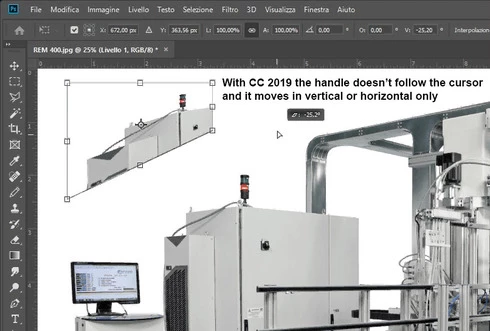


Which setting I have to change in order to have the same behavior of the tool as in Photoshop CC 2018 (release 19)?
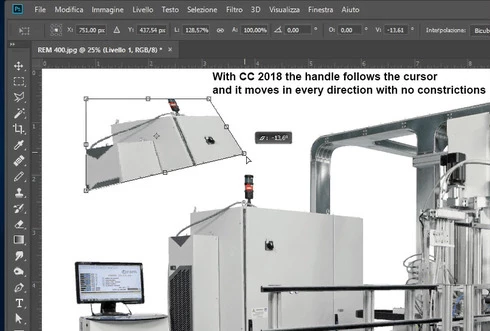


Many thanks!!!

Luciano

This topic has been closed for replies.

128 replies

Kukurykus
Legend
November 4, 2018
I'm even better - saw like you secretly changed avatar twice during few minutes! Edit: 3 times now!
davideb47470794
Participating Frequently
November 4, 2018
Lol way to go before your 543 Posts:) Kudos
Kukurykus
Legend
November 4, 2018
Loll you're good - 8 posts / 8 likes 🙂
davideb47470794
Participating Frequently
November 4, 2018
No negativity here, PS improved million times since 2005 when I started using it, and good if they take it to the masses on mobile platforms and make billion so it improves even more in the future, my point is about disruption to workflow of pro user that should be minimised or avoided

After all WE made PS so popular as it it is today, everyone on the planet knows photoshop because we pro photographer and retoucher were using it daily to work  on magazines and
clients images
Kukurykus
Legend
November 4, 2018
What are tousends of dollars by million of them supplied by other involved corporation to sell their products? What about future where old computers we use now are dinosaurs by those kids sit by from early years and can do more though beeing limited? They want to survive they must be step forward before new times will come with no doubt.

I forgot to meantion transformation of shapes that joachim barrum pointed was kept by old way.
davideb47470794
Participating Frequently
November 4, 2018
Makes sense, but wouldn't be best too keep version for different platform separated? mobile more geared to occasional user and workstation for pro use? we spent hundreds or thousands $$ over the years after all
Kukurykus
Legend
November 4, 2018
If that is true what I heard they want it to adjust to iPad and one weekend users, that are main target now. Regarding iPad version of Ps I have no idea how many of regular Photoshop is in its Photoshop, but they are limited to not having some workstation keys, so that is the reason we suffer now from changes favouring other devices users. Moreover, if their version of Ps got basic stuff to do rapid 'phone' corrections that explains why layers transformation was only one they changed, but not for vectors, paths, texts or smart objects and different objects inside one group.
davideb47470794
Participating Frequently
November 4, 2018
Exactly, consistency is key for anyone working with PS, as if crazy tight deadlines and unrealistic expectations from clients were not enough, we also  have to deal
 with working out new shortcuts, behaviours and updates not so smooth often
donbarrum
Inspiring
November 4, 2018
I agree, well, at least you have the old way of scaling for Smart objects and Shapes 😉 

I dont understand why they changed any of these. Before it was consistent. ANd multiple undos was there as well, I guess anyone who wanted could put it on ctrl+z in shortcut prefereneces before as well.... These are not features, just stupidity changes imo
davideb47470794
Participating Frequently
November 4, 2018
True.

But still don't see the point of having to hold shift when using a 'free' resize tool, not so free really!! 
Plus if you do more than one step and forget to hold shift again it mess up with the positioning you did, really annoying

bugs me off as much as the new "undo" thingy as I use them both a lot!