


Inspiring
October 26, 2018

P: Free Transform/Distort tool inconsistency

  • October 26, 2018
  • 128 replies
  • 3520 views

Hello,

using the tool Free Transform (Ctrl+T) in the new version of Photoshop CC 2019 (release 20.0.0) on a Windows 10 64 bit PC, I'm not able anymore to move the handle of a selected area (using the Ctrl button) in a free mode, now I can move it along the vertical or horizontal ax only.
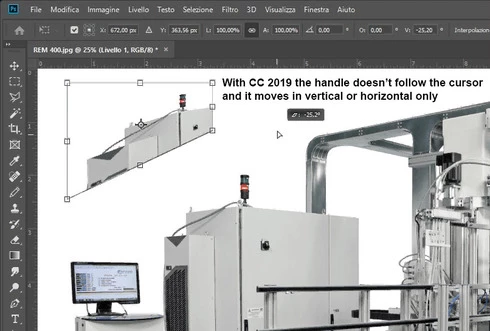


Which setting I have to change in order to have the same behavior of the tool as in Photoshop CC 2018 (release 19)?
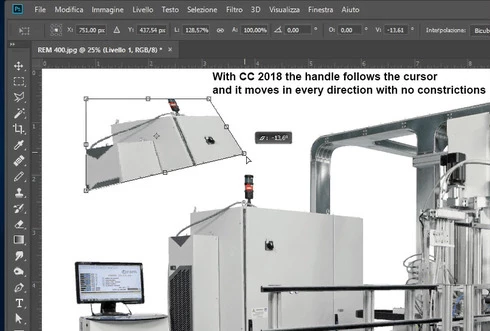


Many thanks!!!

Luciano

This topic has been closed for replies.

128 replies

donbarrum
Inspiring
November 4, 2018
No new user can get comfy with this change as long as its different on all types of layers. That is the annoying change that makes this new "feature" (or whatever Adobe likes to call flipping keyboard shortcuts around) so frustrating.
Kukurykus
Legend
November 4, 2018
New users won't see any difference. They mainly focus on learning Photoshop that takes 1 - 2 years before realise something could be better. But when they're finaly familiar with Photoshop they will find to be upset like we are if Adobe will keep making another changes instead of imprevements! 😞
davideb47470794
Participating Frequently
November 4, 2018
Problem is we have no options, honestly who would ever change using PS for his work?  
it's just that Adobe before implementing changes to tools should take into account that takes years to know PS well and make full use of shortcuts and features.

So yes new features are welcome, improved performances of tools yes welcome too,  but changes of behaviour of tools not as much...
Kukurykus
Legend
November 4, 2018
I guess they had to do survey to predict how many of us will be loyal to their product after making some unfriendly changes. I suppose they won't lose many users while can by happy of deal they could do with Apple who might have give them enough money to develop Photoshop this way.
davideb47470794
Participating Frequently
November 4, 2018
I too think is a terrible idea to have to hold shift to 'free transform' what's the point? is it a free transform tool or not?
15 years of PS use and having to change habits is confusing, lost productivity time would say

Earth Oliver
Legend
November 2, 2018
The smart objects one is a bug caused by a corrupted prefs files. Everything but vectors are supposed to constrain, but either during the install or Ps being put in the background while transform is active, causes the corruption. You can fix temporarily by doing a pref reset, but it'll eventually happen again
Inspiring
November 2, 2018
Maybe this would be a solution?
  1. Cmd/Ctrl + T
  2. Drag from any side to scale proportionally (that’s it)
  3. No modifier keys required. Just re-size.
  4. To Commit Changes: press checkmark, press return, or click anywhere outside of bounding box
  5. The Big Change in Free Transform is that you no longer need to use the Shift Key. You just drag. Using the Shift key will distort the image now.
From: https://medium.com/@mikemurphyco/259-free-transform-photoshop-cc-2019-a309445af581

Hope it helped?
donbarrum
Inspiring
November 1, 2018


The new uniform scale by default is nice, but its very hard to get used to when the program is full of inconsistency. Like transform bitmap is uniform, transform shape you need to hold ctrl+shift for it to scale the same way. Same goes for text, which is uniform, but smart objects are not....why?!? So currently it only makes things a lot more confusing than it being a change for the better.
Inspiring
October 31, 2018
Solution: Holding shift down works with distorting smart objects as it did in the 2018 version. Thank you for the tip!
Inspiring
October 31, 2018
The Place command seems to have similar issues. I'm still trying to get used to it.