
Inspiring
September 27, 2017

P: Gradient Fill and Artboards

  • September 27, 2017
  • 35 replies
  • 13655 views

When creating an artboard with a gradient fill, adjust as needed, then export via export artboards to files, what exports doesn't match what is shown in PS.

This is in PS:

These are the settings:
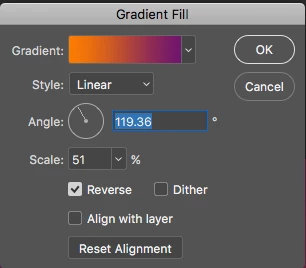
This is what it looks like when exporting:

This topic has been closed for replies.

35 replies

Legend
December 14, 2021

@niki_zifcak can you provide a link to your example PSD that you're using in your video?

Participant
December 14, 2021

Hi, In the last few months, I've been having trouble exporting artboards with gradient. I found that when I change the shape to a smart object, it exports me fine. But it's annoying and sometimes I forget about it. Otherwise, it does weird things. It used to work nicely for me even though I had 30 or more artboards.

Does anyone have a solution?


PECourtejoie
Community Expert
Community Expert
December 14, 2021

I will convert this thread to a bug report.

Chuck Uebele
Community Expert
Community Expert
September 28, 2017

Ok, I'm seeing it now. Your example was very pronounced. I didn't realize that you were using an adjustment layer for the gradient. I made the gradient on a normal layer. It looks like a bug. What seems to be happening is in the process of exporting, the gradient is readjusting itself to the cropped version of the image. So instead of the the gradient extending beyond the artboard to the edges of the full document, the gradient is adjusted to the edges of the artboard, thus making the transitions sharper. Only thing I can say is to duplicate and rasterize any gradient adjustment layers before you export the artborads.

davescm
Community Expert
Community Expert
September 28, 2017

Hi where are you viewing the exported jpeg for your second screenshot ?

Is it back in Photoshop , a color managed browser (such as Firefox with color management turned on)  or a non-color managed application (most browsers & viewers)?

Dave

Inspiring
September 28, 2017

I have opened it in PS and Mac Image Viewer and it's all the same issue. I tried it with a new gradient and it did the same thing.

Example file: Dropbox - Untitled-1.psd

Chuck Uebele
Community Expert
Community Expert
September 27, 2017

I'm not seeing this. What file type are you saving to? What is the color space of your original and of the new saved file? What are you viewing the new file in - Photoshop or some browser?

Inspiring
September 27, 2017

Saving as RGB 8bit Jpeg to same settings, no color space changes. Viewing in PS or any other Mac image viewer.