
Inspiring
Sep 27, 2017 7:22 PM UTC
Needs More Info

P: Gradient Fill and Artboards

When creating an artboard with a gradient fill, adjust as needed, then export via export artboards to files, what exports doesn't match what is shown in PS.

This is in PS:

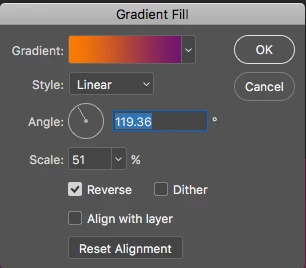
These are the settings:
This is what it looks like when exporting:

This topic is closed to new replies. Start a new post to keep the conversation going.

45 replies

PECourtejoie
Community Expert
Community Expert
May 24, 2022 1:19 PM UTC

@Earth Oliver it took a bit more than 5 month, once the thread was properly labeled as a bug report, and not lost in a sea of other discussions.

Translate
Earth Oliver
Legend
May 23, 2022 3:35 PM UTC

did it really take FIVE YEARS to fix this bug?

Translate
ClaudiaR99
Community Manager
Community Manager
May 23, 2022 2:43 PM UTC

Hello @roboroaster , I apologize this is causing inconveniences. The issue has been fixed in June release. Please make sure to updare once this new release is out to the public. In the meantime, the option Export As is exporting the png with the correct gradient fill angles.

Translate
gregseth
Known Participant
May 22, 2022 7:03 PM UTC

Five years no fix? This is a joke.

Translate
MrGlennJones
Known Participant
Feb 25, 2022 10:17 AM UTC

btw if i select the artboard and do "quick export as png" it also saves the gradient fine without prior converting to a smart object

Translate
MrGlennJones
Known Participant
Feb 25, 2022 10:12 AM UTC

hi guys, i have also stumbled on this bug this morning...

it appears if i use a gradient on a shape layer and a layer style gradient on a pixel layer, the 'export artboards to files' process seems to export the incorrect gradient but if i convert the shape layer or pixel layer to a smart object it exports ok.

Translate
ClaudiaR99
Community Manager
Community Manager
Jan 4, 2022 10:37 PM UTC

This issue has been reproduced with the file provided. Ps engineers are looking into it. 

Translate
ClaudiaR99
Community Manager
Community Manager
Jan 4, 2022 10:04 PM UTC

@PECourtejoie I'll be creating a ticket for this issue. Thanks for bringing it to our attention.

Translate
roboroaster
Participant
Mar 24, 2022 2:59 AM UTC

Photoshop 2022 23.2.2

Mac OS Monterey 12.2.1


This only started happening after updating to 2022. For example, I have 4 artboards with the same square with gradient like below.


When i choose "export > artboards to files" and expot PNGs of each artboard, the gradient shifts on each one when it should all be the same. see output files below with the shifted gradient.


This never happend to me before until the update so im assuming is a bug, but a very specific bug which can go unnoticed. I use this feature a lot instead of the "export as" because it allows me to customize my settings a bit better. Please adobe team help resolve this issue :), thank you.

Translate
ClaudiaR99
Community Manager
Community Manager
Jan 4, 2022 8:35 PM UTC

Hello @PECourtejoie , @J453 , if there is a jira ticket, please assign to clrodrig. Thanks!

Translate
Participant
Dec 15, 2021 8:33 AM UTC

Hi @J453, here is the link with PSD.
Those export images are from my iMac. Now I've tried to open it over the Creative Cloud on a MacBook and it's a lot better there, but still not without problems.

Translate